
• Skip to primary navigation
  • Skip to main content
  • Skip to footer

Keppie Careers

Social media speaker, social media consultant, job search coach

  • About
    • Expert Job Search and Social Media Consultant / Speaker
  • Services
    • For Job Seekers
    • For Entrepreneurs
    • Social Media Coaching and Consulting
    • Speaking/Keynotes
  • Resources
    • Sample Resumes
    • Quoted In
  • Books
  • Blog
  • Contact

How to update your LinkedIn public profile URL

January 25, 2011 By Miriam Salpeter

Maybe you’ve heard that job search is moving beyond job boards and LinkedIn is the target of choice for many recruiters and hiring managers? This is not news; I have been sharing this information for years! A recent Wall Street Journal article reiterated the fact that many companies are looking at online social networks, such as LinkedIn, instead of advertising positions on job boards.

Need help knowing what to say when you look for a job?
Check out my new book: 100 Conversations for Career Success

I’ve written quite a bit about how to optimize your LinkedIn profile. From your headline to your summary and skills to how you describe your experience, education, patents, etc…and everything in between. Today, I thought I’d point out a basic fix for LinkedIn that you may not realize is important: your LinkedIn public profile URL. This is mine (at the bottom of the picture):
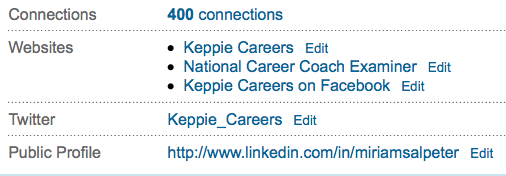
Unless you updated your URL, it has a bunch of random numbers after your name. In other words, it would not be something you will want to copy an paste on your resume for people to find your LinkedIn profile, and it won’t be easy to share as part of your e-mail signature.

It’s very easy to update this URL to a “vanity” link. Simply EDIT your profile in LinkedIn and click on “Edit” at the end of where it shows your Public Profile (as shown above). You’ll see a screen that looks like this (I’m only showing the top):
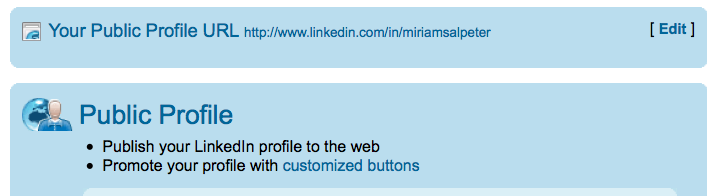
Simply select to EDIT your public profile URL from this screen (right at the top). You’ll then see:
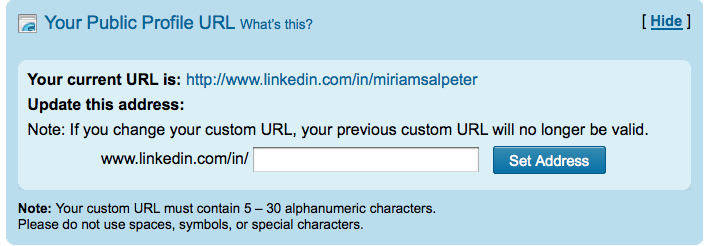
The page will list your current URL and give you the opportunity to update it to your name (if it is available). Try filling in your first and last name and click “SET ADDRESS.” If it is not available, try different combinations of your name with a middle name, or even use your credentials: JaneSmithMBA, for example. The goal is to have an easy-to-use URL that looks like it makes sense when you post it on your materials.

Once you find something that works and select “Set Address,” you are ready to go!

Having a vanity URL is important since it gives you an easy link to share, but it also makes you appear to be someone who knows what you are doing on LinkedIn — you’ll seem more socially media savvy than the next guy!

photo by tychay

Filed Under: Social Networking Tagged With: career coach, how to find a job, how to use linkedin, keppie careers, linkedin, LinkedIn public profile URL, Miriam Salpeter

5 tips to write a winning resume

January 19, 2011 By Miriam Salpeter

With five candidates for every job, competition is fierce. Your online profile impacts your chances to win interviews, but your resume is still the most crucial element of your job search strategy.

Here are five tips to help you identify how to appeal to your targeted employers:

1.  Study organizations’ websites. Companies spend a lot of time, effort, and money compiling their public relations profiles for visitors. Look for repeated words and phrases, tag lines and hints about their philosophical approaches. Some employers include videos or testimonials from employees to illustrate their corporate culture.

What can you learn?

Is the company leadership focused? Team oriented? Do they value diversity? Is community service important? What are their goals? Do they specify problems they solve? What buzzwords appear multiple times on the sites? Studying their official online presence offers a window for you to determine a) if the job is a good fit and b) how to market yourself for the position.

Read the rest on my weekly blog on U.S. News & World Report’s Careers site…

How to target your resume for an employer

photo by Eileen Sand

Filed Under: Resume Advice Tagged With: Career Advice, career coach, how to write a great resume, keppie careers, Miriam Salpeter, US News

How to ask for LinkedIn recommendations

January 16, 2011 By Miriam Salpeter

You’ve probably seen it on LinkedIn — “6 people have recommended Bill,” or “16 people have recommended Sue.” Having at  recommendations on LinkedIn will help people recognize your strengths.

There are a few best practices when it comes to asking for recommendations on LinkedIn:

  • It is not not necessarily better to have a lot of endorsements. You don’t need 58 recommendations. In fact, some people say that they are suspicious when people have what they consider excessive numbers of endorsements. I was once conducting a workshop, and a participant found a colleague who had a lot of recommendations — I can’t remember exactly how many, but a lot! She said, “Wow, that’s impressive.” Upon further investigation, each recommendation was reciprocal — that is, she had endorsed everyone who endorsed her. All of the sudden, it seemed less impressive. Which leads us to…
  • Be sure not all of your recommendations are “you endorse me and I’ll endorse you.”

It’s easy to ask for a recommendation on LinkedIn. (Maybe a little too easy!) All you need to do is click through to “Privacy and Settings” and under the “Profile” tab, click “Manage Your Recommendations.”  Click “Ask for Recommendations” on the top toolbar. Then, you can choose the job you want a recommendation for and select people to ask for the endorsement.

Here are some tips to get the best recommendations possible:

  • NEVER ask more than one person per message. Each recommendation request should be personalized and specific to the endorser.
  • Recognize the most people have no idea what to say and can use some guidance. It is your job to help steer your recommenders along the right path. For example:

“I am updating my LinkedIn profile, and I’d be honored if you would write a recommendation for me. While I am not currently looking for a job, the skills most important in my field include:  customer service/communication abilities, being self-directed and deadline-driven, as well as paying attention to details and having an inquisitive nature. I hope you will be able to comment on any of those in your note. I have an updated LinkedIn profile if you’d like to review it.”

If you need help updating your LinkedIn profile, contact me!

Providing information that helps your colleague or former supervisor know what you want him or her to say goes a long way to ensuring a) he or she actually writes out a reply and b) the recommendation has information that is actually useful to you.

It’s up to you to steer your career and job search related information. Follow these links for additional information about asking for recommendations:

Be sure to vet your references.

10 tips to land the best work references

Keep in touch with job references.

Prepare your references for job search success.

photo by .michael.newman.

Filed Under: social media, Social Networking Tagged With: asking for recommendations, career coach, how to get a jb, how to use linkedin, keppie careers, linkedin, Miriam Salpeter, references for a job search

2 Reasons you should not be looking for a job

January 12, 2011 By Miriam Salpeter

It may be unexpected advice from a job search coach, but ideally you should not be looking for a job. Here’s why you need to get off those job boards and readjust your approach:

1. Instead of searching for a job, find a problem you can solve.

This is a proactive approach, and forces you to network and interact with a variety of people and to research problems facing organizations requiring your expertise. Identify thought leaders in your field and begin to insert yourself in their conversations. (One good tip is to discover and read blogs targeting your industry. Check Alltop.com for a great list or use Google’s blog search.)

Trying to find a problem to solve instead of a job requires you to consciously identify skills you plan to use in your next opportunity and to outline your accomplishments. If you stop searching for a job and start paying attention to what you have to offer, you will recognize you control more than you may have realized when it comes to your search.

Read the rest on my NEW, weekly blog on U.S. News & World Report’s Careers site…

Don’t Look for a Job – Make the Job Come to You


Photo by Jeffrey Beall

Filed Under: Career Advice Tagged With: career coach, don't look for a job, how to find a job, keppie careers, Miriam Salpeter, resume writing, U.S. News & World Report

Best Careers for 2011

December 26, 2010 By Miriam Salpeter

Following job trends has some advantages. I report on U.S. News & World Report’s “Best Careers” article every year. (This year, I am excited to announce that I’ve been invited to join U.S. News’ team of career bloggers — starting in mid-January!) In my many years following this report, categories often do not change very much from year to year. That is a good thing for anyone using the list to make a career choice!

For example, the article notes that “All of the healthcare jobs on last year’s list have made the cut again this year, plus two new positions: massage therapist and athletic trainer. While the field of athletic training doesn’t offer the sheer number of positions as nursing or dental hygiene, it outranks nearly all other healthcare occupations for expected job growth.”

It’s important to remember that jobs on this list are not necessarily easy to land! Although jobs are cut from the list if they have a higher-than average unemployment rate, the article notes that, with 9.6% unemployment, there are still (statistically) five unemployed people for every job, compared to an average of 1.7 people for every job in the three years before the recession.

Do Your Research

Every job seeker should keep an eye on his or her industry and make plans for the future with an informed outlook. I like to remind readers that it’s a good idea to set a Google alert for organizations and fields of interest to you so you’ll be aware when there are newsworthy ups and downs in your market. Clearly, there are trends in industries. While there are no guarantees, keeping an eye on these surveys and data should help direct those seeking career change make their plans.

Learn what you can about the number of job opportunities, salary expectations, educational requirements, job satisfaction — make a list of what is important to you and conduct a personal analysis to determine a good direction for your career.

Luckily, there are more and more resources every day to help you with your research.

You can go “old school” and talk to people you know or people they know via informational interviews. Or, expand your networking circle by using Twitter to research your job, LinkedIn to connect with new colleagues, Facebook (via BranchOut or Jibe) and Quora to meet new people who may have advice, information or recommendations for you.

Learn what blogs are popular and respected in your niche (I like to use Alltop.com as a great resource) and find out what your mentors are saying. Find them on Twitter (WeFollow.com is my favorite list for Twitter) and learn who they talk to, what conferences they attend (and what they think of the speakers).

Hop on a Twitter chat to connect with people in your targeted industry. Before you know it — with skill and persistence — you can become one of them! (Read this story of someone who has decided to lead the way in his industry, even if his colleagues are not already joining him on social media.)

Clearly, there are many, many ways to learn what everyone is saying and — most importantly — to insert yourself into the conversations (via participating in social media, meeting local colleagues, attending professional conferences, etc.) to really get to know about a field.

Here is U.S. News & World Report’s list of top jobs for 2011, broken down by categories considered promising growth fields:

Science and Technology

– Biomedical engineer

– Civil engineer

– Computer software engineer

– Computer support specialist

– Computer systems analyst

– Environmental engineering technician

– Environmental science technician

– Hydrologist

– Meteorologist

– Network architect

Health care


– Athletic trainer

– Dental hygienist

– Lab technician

– Massage therapist

– Occupational therapist

– Optometrist

– Physician assistant

– Physical therapist

– Physical therapist assistant

– Radiologic technologist

– Registered nurse

– School psychologist

– Veterinarian

Social Service

– Clergy

– Court reporter

– Education administrator

– Emergency management specialist

– Firefighter

– Marriage and family therapist

– Mediator

– Medical and public health social worker

– Special-education teacher

– Urban planner

Business and Finance

– Accountant

– Actuary

– Financial adviser

– Financial analyst

– Logistician

– Meeting planner

– Public relations specialist

– Sales manager

– Training specialist

Creative and Service

– Commercial pilot

– Curator

– Film and video editor

– Gaming manager

– Heating, air conditioning, and refrigeration technician

– Interpreter/Translator

– Multimedia artist

– Technical writer

Be sure to review U.S. News’ entire, informative article outlining the various opportunities and their methodology.

Please comment if you know anything about these professions! Would you recommend them? What are your experiences? Share in the comments!

Don’t forget that clear, concise, optimized job search materials AND a strong, well executed plan are key for job search success! I can help with every part of your job hunt! Need a great resume? Tips to use social networking? Interview coaching?  If you need help mobilizing your networks and your job search plans, learn more about how I can help you! While you’re at it, don’t forget those social networks! Be sure to become a fan of Keppie Careers on Facebook…I’d be thrilled to have you as part of the community! Since we’re on the subject of doing something new…Are you on Twitter? Jump on and touch base with me @keppie_careers.

photo by Court reporter

Filed Under: Career Advice, Drive Your Career Bus, Job Hunting Tools, New Year Career, New Year Career Tagged With: Best Careers for 2011, Career Advice, career change, career coach, jobs that are hiring, keppie careers, Miriam Salpeter, U.S. News, U.S. News & World Report, what job to do in 2011, where are the jobs

  • « Go to Previous Page
  • Page 1
  • Interim pages omitted …
  • Page 11
  • Page 12
  • Page 13
  • Page 14
  • Page 15
  • Interim pages omitted …
  • Page 53
  • Go to Next Page »

Follow Us!

  • Facebook
  • Instagram
  • LinkedIn
  • Pinterest
  • Twitter

Be an Insider: Sign Up to Receive Special Offers & Free Gift


About Keppie Careers

Are you a job seeker or business owner? You’ve come to the right place!
Click here to find out more.

Contact Us

Have a question or comment?
Click here to Contact Us.
© Copyright 2024 Keppie Careers