• Skip to primary navigation
  • Skip to main content
  • Skip to footer

Keppie Careers

Social media speaker, social media consultant, job search coach

  • About
    • Expert Job Search and Social Media Consultant / Speaker
  • Services
    • For Job Seekers
    • For Entrepreneurs
    • Social Media Coaching and Consulting
    • Speaking/Keynotes
  • Resources
    • Sample Resumes
    • Quoted In
  • Books
  • Blog
  • Contact

How to use LinkedIn’s tools to get a promotion

January 26, 2011 By Miriam Salpeter

One great feature of LinkedIn is that you can follow companies and keep on top of when people update their profiles indicating they changed jobs.

Just follow the Companies tab from LinkedIn’s top toolbar (see below):

Then, select a company of interest (you may choose a location a certain distance away from where you live or want to live):
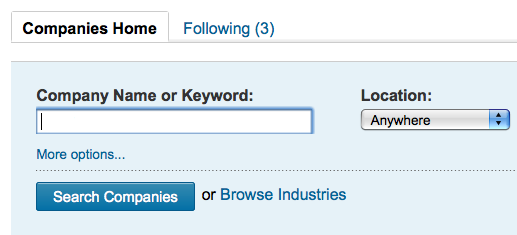
Search companies or browse industries, and LinkedIn will show if you have anyone in your network working in those organizations. When you follow companies, you’ll receive regular updates when someone working for that company updates his or her profile indicating a change in position — maybe suggesting an opening to pursue via your network!

In fact, LinkedIn just released information suggesting the best months (statistically, per their network) to get a promotion. Their press release noted a Buck Consultants survey, “Compensation Planning for 2011,”saying workers in the U.S. can expect only modest pay raises this year, although salary increases for 2011 will average 2.8 percent, an increase from the two previous years.

According to LinkedIn’s data, the top three months for professionals in the U.S. to get promoted within their company are:

  1. January
  2. June
  3. July

Interestingly, their data show professionals in accounting, defense & space, education management, higher education, military, non-profit organization management and research tend to see a spike in promotions over the summer months more than other industries.

The data indicate a generational link to the timing of promotions. Their study notes that Millennials (born in the 1980s) “are the most likely to be promoted throughout the year (rather than just in January which is the case for most professionals).”

Job seekers (and anyone driving their own “career bus” should take advantage of LinkedIn’s tools. The amount of data they access regarding professional trends and the services they provide are extremely useful beyond simply sharing a profile. DJ Patil, LinkedIn’s chief scientist explains,

“LinkedIn was launched in 2003, but our data allow us to identify professional trends that span decades…By shedding light on professional patterns, we hope to help our members achieve their career goals by using LinkedIn in the most effective and productive way possible.”

“One of the best ways to get promoted is by promoting yourself,” said Lindsey Pollak, a career and workplace expert. “LinkedIn is the perfect place for professionals to get clients, vendors and other third parties to post recommendations on their profile. By encouraging other professionals to champion the work you do in your current role, you’ll be more likely to advance to the next level.”

Take a look at how LinkedIn suggests you leverage their social network to land a promotion:

Shine the Spotlight on New Skills

Impress your manager by learning new skills that go above and beyond your current role. Make sure your LinkedIn Profile is complete and includes all the skills you’ve acquired. Expanding your horizons while working full time is a commendable endeavor that’s worth calling attention to. If your company offers an education reimbursement program, take advantage of it. If you have industry certifications or went back to school for a higher degree, mention them in your profile and during your review.

Get Connections in High Places

LinkedIn Advanced People Search lets you search by title so you can find professionals that have the position you want to be promoted to. Reaching out to mentors and peers is one way to prep for that 2011 promotion. After the promotion, a strong relationship with a peer will give you a friendly ear you can rely on for advice if things get tough.

Toot Your Horn

Remind your manager of your accomplishments. Even if they were monumental, he or she may have forgotten about them. Document milestones in your career by requesting quality recommendations on LinkedIn. If a customer sends you an email thanking you for the amazing event you put together for them in record time, gently suggest that they provide you with a recommendation (if they feel comfortable doing so) and also forward the email to your manager so they’re aware of the praise you’re receiving.

photo by nan palmero
Filed Under: Career Advice, Social Networking Tagged With: career coach, how to get a job, how to use linkedin, keppie careers, Lindsey Pollak, linkedin, Miriam Salpeter, when to get a promotion

How to update your LinkedIn public profile URL

January 25, 2011 By Miriam Salpeter

Maybe you’ve heard that job search is moving beyond job boards and LinkedIn is the target of choice for many recruiters and hiring managers? This is not news; I have been sharing this information for years! A recent Wall Street Journal article reiterated the fact that many companies are looking at online social networks, such as LinkedIn, instead of advertising positions on job boards.

Need help knowing what to say when you look for a job?
Check out my new book: 100 Conversations for Career Success

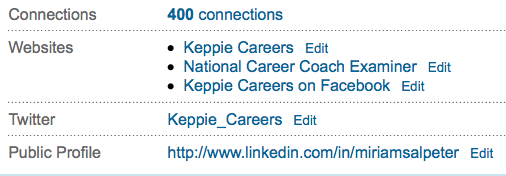
I’ve written quite a bit about how to optimize your LinkedIn profile. From your headline to your summary and skills to how you describe your experience, education, patents, etc…and everything in between. Today, I thought I’d point out a basic fix for LinkedIn that you may not realize is important: your LinkedIn public profile URL. This is mine (at the bottom of the picture):

Unless you updated your URL, it has a bunch of random numbers after your name. In other words, it would not be something you will want to copy an paste on your resume for people to find your LinkedIn profile, and it won’t be easy to share as part of your e-mail signature.

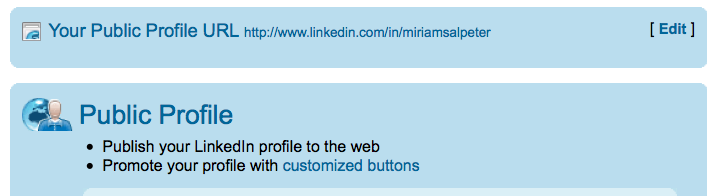
It’s very easy to update this URL to a “vanity” link. Simply EDIT your profile in LinkedIn and click on “Edit” at the end of where it shows your Public Profile (as shown above). You’ll see a screen that looks like this (I’m only showing the top):

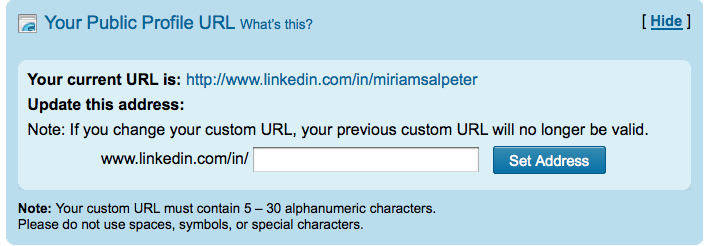
Simply select to EDIT your public profile URL from this screen (right at the top). You’ll then see:

The page will list your current URL and give you the opportunity to update it to your name (if it is available). Try filling in your first and last name and click “SET ADDRESS.” If it is not available, try different combinations of your name with a middle name, or even use your credentials: JaneSmithMBA, for example. The goal is to have an easy-to-use URL that looks like it makes sense when you post it on your materials.

Once you find something that works and select “Set Address,” you are ready to go!

Having a vanity URL is important since it gives you an easy link to share, but it also makes you appear to be someone who knows what you are doing on LinkedIn — you’ll seem more socially media savvy than the next guy!

photo by tychay

Filed Under: Social Networking Tagged With: career coach, how to find a job, how to use linkedin, keppie careers, linkedin, LinkedIn public profile URL, Miriam Salpeter

5 tips to write a winning resume

January 19, 2011 By Miriam Salpeter

With five candidates for every job, competition is fierce. Your online profile impacts your chances to win interviews, but your resume is still the most crucial element of your job search strategy.

Here are five tips to help you identify how to appeal to your targeted employers:

1.  Study organizations’ websites. Companies spend a lot of time, effort, and money compiling their public relations profiles for visitors. Look for repeated words and phrases, tag lines and hints about their philosophical approaches. Some employers include videos or testimonials from employees to illustrate their corporate culture.

What can you learn?

Is the company leadership focused? Team oriented? Do they value diversity? Is community service important? What are their goals? Do they specify problems they solve? What buzzwords appear multiple times on the sites? Studying their official online presence offers a window for you to determine a) if the job is a good fit and b) how to market yourself for the position.

Read the rest on my weekly blog on U.S. News & World Report’s Careers site…

How to target your resume for an employer

photo by Eileen Sand

Filed Under: Resume Advice Tagged With: Career Advice, career coach, how to write a great resume, keppie careers, Miriam Salpeter, US News

How to use Facebook for your job hunt

January 17, 2011 By Miriam Salpeter

In the ever-changing face of social media tools, more and more applications and companies are focusing how how to use Facebook’s social graph of over 600 million users for professional networking purposes.

If you regularly use Facebook, it’s not news to you that they updated their settings and redesigned your “home” Facebook page. If you don’t regularly review your own Facebook profile, it may be time to start! It is important to know how your profile looks to others and to use it to your advantage. Visit your page and click on PROFILE.

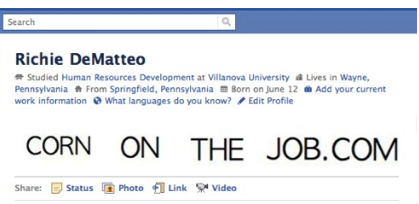
You can see that it now displays photos as well as information about where you went to school, where you work, where you are from and your relationship status. In the past, this was data users only found if they went looking through the various tabs on your profile.

If you are clever, like Richie DeMatteo of CornOnTheJob fame, you can use this new set up to market your job hunt. He tagged himself in some messages and posted them to illustrate how you may manipulate the newest Facebook design to your advantage:

You can see CORN ON THE JOB instead of the photos that would normally be in those spots. Fun and original!

The design means that it is much easier for people to to learn more about you without much effort.

Learn how to use photos, the education and work section, languages and privacy settings to your advantage on my Job-Hunt.org column…

photo by jaycameron

Filed Under: social media, Social Networking Tagged With: Corn on the Job, how to design a facebook page, how to find a job, keppie careers, Miriam Salpeter, Richie DeMatteo, use Facebook for your job hunt

How to ask for LinkedIn recommendations

January 16, 2011 By Miriam Salpeter

You’ve probably seen it on LinkedIn — “6 people have recommended Bill,” or “16 people have recommended Sue.” Having at  recommendations on LinkedIn will help people recognize your strengths.

There are a few best practices when it comes to asking for recommendations on LinkedIn:

  • It is not not necessarily better to have a lot of endorsements. You don’t need 58 recommendations. In fact, some people say that they are suspicious when people have what they consider excessive numbers of endorsements. I was once conducting a workshop, and a participant found a colleague who had a lot of recommendations — I can’t remember exactly how many, but a lot! She said, “Wow, that’s impressive.” Upon further investigation, each recommendation was reciprocal — that is, she had endorsed everyone who endorsed her. All of the sudden, it seemed less impressive. Which leads us to…
  • Be sure not all of your recommendations are “you endorse me and I’ll endorse you.”

It’s easy to ask for a recommendation on LinkedIn. (Maybe a little too easy!) All you need to do is click through to “Privacy and Settings” and under the “Profile” tab, click “Manage Your Recommendations.”  Click “Ask for Recommendations” on the top toolbar. Then, you can choose the job you want a recommendation for and select people to ask for the endorsement.

Here are some tips to get the best recommendations possible:

  • NEVER ask more than one person per message. Each recommendation request should be personalized and specific to the endorser.
  • Recognize the most people have no idea what to say and can use some guidance. It is your job to help steer your recommenders along the right path. For example:

“I am updating my LinkedIn profile, and I’d be honored if you would write a recommendation for me. While I am not currently looking for a job, the skills most important in my field include:  customer service/communication abilities, being self-directed and deadline-driven, as well as paying attention to details and having an inquisitive nature. I hope you will be able to comment on any of those in your note. I have an updated LinkedIn profile if you’d like to review it.”

If you need help updating your LinkedIn profile, contact me!

Providing information that helps your colleague or former supervisor know what you want him or her to say goes a long way to ensuring a) he or she actually writes out a reply and b) the recommendation has information that is actually useful to you.

It’s up to you to steer your career and job search related information. Follow these links for additional information about asking for recommendations:

Be sure to vet your references.

10 tips to land the best work references

Keep in touch with job references.

Prepare your references for job search success.

photo by .michael.newman.

Filed Under: social media, Social Networking Tagged With: asking for recommendations, career coach, how to get a jb, how to use linkedin, keppie careers, linkedin, Miriam Salpeter, references for a job search

  • « Go to Previous Page
  • Page 1
  • Interim pages omitted …
  • Page 85
  • Page 86
  • Page 87
  • Page 88
  • Page 89
  • Interim pages omitted …
  • Page 174
  • Go to Next Page »

Follow Us!

  • Facebook
  • Instagram
  • LinkedIn
  • Pinterest
  • Twitter

Be an Insider: Sign Up to Receive Special Offers & Free Gift


About Keppie Careers

Are you a job seeker or business owner? You’ve come to the right place!
Click here to find out more.

Contact Us

Have a question or comment?
Click here to Contact Us.
© Copyright 2024 Keppie Careers