• Skip to primary navigation
  • Skip to main content
  • Skip to footer

Keppie Careers

Social media speaker, social media consultant, job search coach

  • About
    • Expert Job Search and Social Media Consultant / Speaker
  • Services
    • For Job Seekers
    • For Entrepreneurs
    • Social Media Coaching and Consulting
    • Speaking/Keynotes
  • Resources
    • Sample Resumes
    • Quoted In
  • Books
  • Blog
  • Contact

Time to BranchOut? How to use Facebook to job hunt

December 22, 2010 By Miriam Salpeter

Did you see that TIME Magazine recently named Mark Zuckerberg “Person of the Year?” As Facebook approaches 600 million users, Zuckerburg has been describing Facebook as an “enabler” – a platform where everyday tasks will be done right on Facebook. For example, you can now buy and sell goods, play games or even find a date. These applications, and many more, are changing the way millions of people live their lives. What does this mean for job search?

I’ve written about how you can use Facebook for job seeking. In the spirit of providing information about some growing social networking tools for you to consider adding to your job search arsenal, here are some details about BranchOut, a Facebook application designed exclusively for career networking.

They call themselves “the leading professional networking service on Facebook” and explain, “Once you sign up for the free service you can:

• Create a professional profile

• Search three million jobs and 14,000 internships

• Identify inside connections at the companies you want to work for

Take a look at this brief video:

BranchOut describes the features listed above:

Professional profile – there are some things you share on Facebook that are meant for friends and family, but not recruiters. BranchOut’s profile is 100% professional. It shows where you’ve worked and gone to school, but does not show personal photo albums or status updates. You can import your profile information from LinkedIn or fill out the profile manually.

Job search engine – you can search for open jobs by company name, position, or skill and filter those jobs by location. For example, you could search for IBM, V.P. of Sales, or sales, and sort your results by city.

Inside connections – the most powerful feature on BranchOut is the ability to identify friends and friends-of-friends at the companies you want to work for. Just type in the name of a company, see your 1st and 2nd degree connections at that company, and request an introduction – if necessary – in just one click.

Facebook is projected to grow to one billion users by 2012, giving it an unparalleled social graph. BranchOut considers this social graph its secret weapon. Some of Silicon Valley’s top investors agree – to the tune of a $6M in funding for BranchOut. Kevin Efrusky, the venture capitalist who invested early in Facebook, Groupon, and BranchOut says, “We fundamentally believe it will change jobs and recruiting. If you look at how most people really get their jobs, it is through their real friends.”

So what does that mean for you? BranchOut says:

If you are a job seeker with a Facebook account, there are two reasons why it’s worth checking out. First, as you get a critical mass of BranchOut connections, you’ll be surprised by how many inside connections you already have at thousands of companies. Second, recruiters are starting to search for new hires on BranchOut, so you do not want to be overlooked.

5 things to do on BranchOut today:

1. Sign up for a free account at www.branchout.com

2. Create a professional profile. If you are applying for one job in particular, make sure to target your communication.

3. Invite your Facebook friends to BranchOut. It’s hard to see the power of your inside connections until you have at least 10 BranchOut connections. You can invite people with a single click.

4. Endorse your friends. Tell employers why they are special and request that friends return the favor.

5. Have fun! Play around with the site. Search for jobs, see you inside connections by searching for companies, and check out the leader board to see which of your friends is the most connected.

Please share what you think in the comments. It’s great to keep up with new tools, and important to spend the right amount of time using the ones that offer the most return on your investment. Be sure to let me know if you try BranchOut!

If you know social media is important, but need help, that’s what I’m here for! If you’re ready to hire someone to help you move ahead with your plans, contact me to find out how you can boost your job search – both online and off line. Check out my new book, Social Networking for Career Success, to learn how to use Branchout and other social networking tools to your advantage!

Filed Under: social media, Social Networking

Important LinkedIn change impacts job seekers

December 10, 2010 By Miriam Salpeter

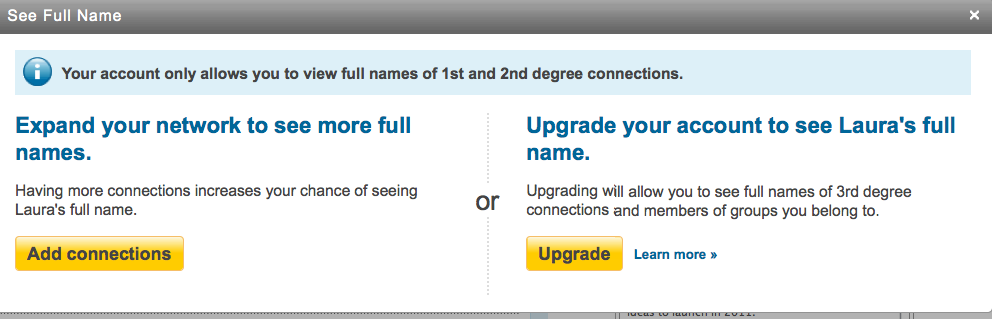
Watching changes in social networking platforms and keeping up-to-date on their ever-changing tools can be a full-time job. My colleague, Jason Alba, author of I’m On LinkedIn, Now What?, posted yesterday about a new development in LinkedIn search that is important for job seekers. He explains that when a non-paying LinkedIn user reviews a third-degree connection’s profile, LinkedIn does not share that person’s name in the headline. (It lists the first name and last initial — see photo below/right). 

It then prompts the user with two choices:

1. To expand your network to enhance your opportunity to connect with the user at a second-degree level. (This would be free, but takes effort.)

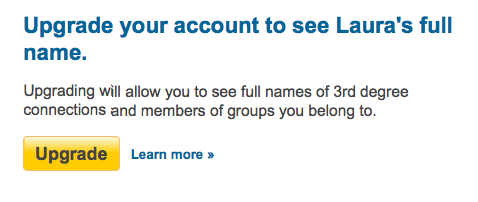
2. To upgrade to a paid account that will allow the person to easily find full names for third-degree contacts

This is an interesting development, and Jason notes that it probably is a precursor for other, similar moves by LinkedIn to withhold information and potentially encourage more people to become paid members.

However, at this point, LinkedIn really does not have the upper hand in preventing people from identifying full contact information or names of those whose last names it may withhold. I can (at this point) still see the entire actual profile of my third-degree connections (sans last name in the headline). Any information they share in their profiles (including listing an email address or full name in their profile or Summary section, their personal websites, Twitter accounts, Slideshares, etc.) is still readily available.

My advice to job seekers (and everyone who wants to make it easy — and free) for people to know who you are? Include your full name in your Summary section, link your other professional websites and social networks that have links to your work or work products and consider sharing an email in the context of your Summary.

While it is possible that LinkedIn will become draconian and try to prevent us from sharing this information, or that it will set things up so we cannot easily access other identifying information (such as Twitter account, websites, etc.), that is not the case right now.

Help someone find you by updating your profile. And, consider having your own social resume — a website that you control to share information you want people to know about you. Contact me if you’re interested in owning YourName.com, but could use some help creating a fully operational site that search engines will love and will showcase your best professional information!

Filed Under: social media, Social Networking Tagged With: how to find a job, how to write a LinkedIn profile, Jason Alba, job search, keppie careers, linkedin, Miriam Salpeter

Consider using Quora to enhance your professional profile

December 9, 2010 By Miriam Salpeter

If you are a regular reader, you know I recommend using social media (Twitter, blogs, LinkedIn, Facebook, etc.)  to enhance your network and expand your reach as a job seeker or entrepreneur.  At a recent social event with other contributors and speakers for Social Media Atlanta’s HR and Recruiting track, I met Douglas Kling, (@DouglasKling), Director of Recruiting at HUNTER Technical Resources. He recommended I look at Quora.com, a network focused on asking and answering questions.

Quora calls itself “A continually improving collection of questions and answers created, edited, and organized by everyone who uses it.” Their goal? “To have each question page become the best possible resource for someone who wants to know about the question.”

Crunchbase notes that Quora was founded in June 2009 and launched in private beta in January 2010:

“One way you can think of (Quora) is as a cache for the research that people do looking things up on the web and asking other people. Eventually, when you see a link to a question page on Quora, your feeling should be: “Oh, great! That’s going to have all the information I want about that.” It’s also a place where new stuff–that no one has written about yet–can get pulled onto the web.”

I found executive recruiter Harry Urschel’s new post in my Google reader while I was writing this post. Harry explains,

“…Quora is unique in the level of professional and expert responses you encounter. Ask a question regarding an Engineering challenge, and it’s not unlikely to get an answer from a Chief Engineer at Motorola or Intel. Ask a question regarding start-ups, and you’re likely to get a response from a Venture Capital expert. Ask questions about Twitter, Facebook, LinkedIn, or virtually any other successful site, and you’re just as likely to get an answer from a Senior Executive from one of those organizations as you are from a power user.”

Similar to LinkedIn’s Answers section, there are questions on Quora about a wide array of topics. For example, someone asked: “Are there metrics on how helpful it is to address a user by their first name for account/marketing emails?” One reply was from Ramit Sethi, a NYT bestselling author of I Will Teach You to be Rich.

You may ask a question to the community, or target it to a particular user. Like Twitter, you can choose to “follow” other users and you will have followers as well. When you sign up, Quora offers you the opportunity to link with your Twitter account, and it will automatically follow Quora members whom you follow on Twitter. I found a very small percentage of people I follow on Twitter were also on Quora right now.

How does a site like this help you? In general, it follows the same principle as other social media sites: sharing information and advice in your subject matter area helps you raise your profile. When you answer questions with good information and people begin to turn to you for advice, your digital footprint (how many people know about you online) increases. When more people know about you, your network grows and this improves your chances for learning about (and being recommended for) opportunities — both jobs and entrepreneurial ventures.

Harry noted that Google found his profile and answers and quickly indexed them (therefore indexing his expertise). Since many employers are Googling candidates, having another resource to showcase your knowledge, skills and abilities in your niche topic can be helpful. It’s also possible (as in any social networking site) to build a rapport with an expert or mentor, which may lead to opportunities to contribute to their projects and/or to meet in person.

As someone who has been using Quora for the past few months, Douglas confirms that it is a good use of time and an interesting use of social media. He explained,

“The format allows for interactive discussion amongst subject matter experts on an ever-growing variety of topics. But, it also levels the playing field between the known experts and the unknown experts. The platform allows heretofore unknown experts in a specific space to increase their digital footprint based on the actual quality of the information they provide.”

Check it out: Quora.com. If you sign up, be sure to look for me: http://www.quora.com/Miriam-Salpeter.

Filed Under: social media, Social Networking Tagged With: Career Advice, Career Coaching, Douglas Kling, Harry Urchel, how can Quora help your job search?, keppie careers, Miriam Salpeter, new social network for entrepreneurs, new social network for job seekers, Quora, why use Quora?

Yes, you can use Facebook for job seeking. 5 steps to get started

September 29, 2010 By Miriam Salpeter

How can you overlook a social network with more members than most countries? With more than 500 million active users; it’s likely that just about anyone you might want to find has a profile on Facebook.

There is a reason we hear more about people losing their jobs based on what they do on Facebook than about those finding jobs as a result of their activity there. Let’s face it (no pun intended!) — it was intended as a social network; it’s a place where people go to unwind, unload and vent. It’s where they go to show off their vacation photos or share a video of their infant’s latest sneeze.

That in mind, you can still create a professional-looking profile on Facebook that may very well be the link you need to land your next job. If you’re looking for a new job, you will want to take advantage of every useful tool. I’ve suggested five steps to help you get started on the right foot on Facebook. Read them on my Social Media and Job Search column at Job-Hunt.org.

If you want to learn how to look for a job today, check out The Career Summit…more than a dozen online presentations (including mine) to help you land that next job!

photo by laikolosse

Filed Under: Job Hunting Tools, Social Networking Tagged With: career coach, FaceBook, how to use Facebook to find a job, job hunt, keppie careers, Miriam Salpeter

If your industry does not participate online, you can lead the way

September 26, 2010 By Miriam Salpeter

Today’s post is one of many from members of the Career Collective community I co-coordinate with my colleague Jacqui Barrett-Poindexter. I encourage you to visit other members’ responses, which are linked at the end of my post. Please follow our hashtag on Twitter: #careercollective.

This month’s question asks everyone to share a favorite career search resource.

I don’t make it a secret that Twitter is my favorite online resource for job seekers. However, many of you may be thinking that Twitter is only useful for people in certain professions — maybe marketing, writing, public relations? It’s easy to see the potential, positive implications for people who make a living in jobs that involve a lot of communicating.

Did you ever think about how you can use Twitter, even if you work in a field that isn’t overly represented in the medium?

I thought I would take the opportunity to share an interview with Brett Vanderwater MBA, CIA, CMA, CTP. Brett is a strategic financial leader who believes social media is useful for all careerists, even those in fields without significant representation. He tweets @BrettVanderH2O, and his blog is called Top & Bottom Line! He answered some questions about the topic of using Twitter, even if not a lot of others in your field have jumped in:

Many people believe that social media is only useful for certain industries. As a finance/business professional, what made you turn to blogging and Twitter, and how have they helped you advance your career?

My first introduction to social media was LinkedIn. I stumbled onto the fact that companies were performing a Google search prior to my interviews based on the fact they knew I was a runner and member of several professional organizations. I did land at Kellogg Company in a controller role at their Atlanta, Georgia facility.

After landing my job, I continued to study the communication power of social networking. I optimized my LinkedIn to include recommendations, news postings, discussions, and groups. I expanded my efforts to include blogging, which allowed for further creativity and helped me spread the word about my expertise in finance. The finance profession can be an introverted group and admittedly, I did take a deep breath prior to sending out the first blog post. Of course, I assumed 10,000,000,000 people would instantly read it! After realizing very few read it, I started advertising the blog on LinkedIn via groups and added Twitter to further leverage and market the blog.

I found Twitter to be a simple, yet confusing tool. This is when I sought professional advice on how to represent a professional image and further leverage the networking opportunities. I contacted Keppie Careers.

While I am still adding to my social network, the career value is the circle/network that it has created. The world I once played in was limited to the city where I lived. Now, the landscape is broad, and I have met professionals from all over the world. I have had the opportunity to speak at several Atlanta area professional forums to further communicate the expertise message. These events were directly related to the usage of LinkedIn, Twitter, and blogging.

Since there is not a critical mass of people in your field on these networks, how have you increased your following and how has that helped you?

The finance field is not very active on social networks, so I broadened my definition of a finance person. I now refer to myself as a Strategic Financial Leader and network with all levels of professionals in an organization. As a result, my LinkedIn contacts increased from 380 connections to 550. My Twitter followers expanded from 175 followers to more than 3,500.

What I learned was to utilize a skill I have been using in my business career – to lead. When a profession is not at the same place that you want to be or see yourself you have two choices: 1. Conform to the profession’s expectations. 2. Redefine it. I am choosing option 2.

Would you recommend that others in industries like yours (where there are not already a lot of people involved online) try using social networks? Why?

I recommend that the finance industry use the power of social networks and embrace the changing communication landscape to enhance knowledge sharing and actualize the globalization that we talk about in the conference room.

I believe the finance industry will embrace social networks and fully leverage its power. The driving factor is that adopting these tools will save money and speed communications, resulting in cost savings and exponential gains to corporations in the future.

Convinced? Take a look at this post about Twitter chats (when people use Twitter to share information and advice about a particular subject). You may be surprised by how many different types of people are using Twitter to connect with people in all different fields.

If you want to learn how to look for a job today, check out The Career Summit…more than a dozen online presentations to help you land that next job!

Read what my colleagues had to say about their favorite resources:

6 Ideas to Put In Your Toolbox, @WorkWithIllness

Your Best Job Search Resource? You!, @WalterAkana

In a Job Search, Knowledge is Power, @barbarasafani

Jump Start Your Job Search Now!, @resumeservice

Favourite Resources for Jobseekers, @GayleHoward

The Best Job Search Tool Ever, @careersherpa

Find What You Do Best, Know Your Stuff, and Connect, @chandlee

27 Recommended Blogs for Entry-Level Job Seekers, @heatherhuhman

Invaluable Resources for Job Search Success, @heathermundell

Favorite Social-Media Resources for Job-seekers, @KatCareerGal

Canadian Resources for Job Seekers, @EliteResumes @MartinBuckland

A Self-Empowering Job Search Resource, @KCCareerCoach

Covering your bases: 5 ultra-useful online career resources, @LaurieBerenson

Favorite resources for Job seekers, @DawnBugni

Top 3 Resources for Job Seekers to Position Themselves as Experts and Increase their Visibility, @expatcoachmegan

Time as a Career Resource: How “Not” to Squander It, @ValueIntoWords

Favorite Internet Resources for Jobseekers, @ErinKennedyCPRW

The Facts Behind Why LinkUp Is the Most Revolutionary Job Search Engine Available to Job Seekers, @GLHoffman

photo by psyberartist

Filed Under: Job Stories, social media, Social Networking Tagged With: Brett Vanderwater, Career Collective, keppie careers, Miriam Salpeter, Top & Bottom Line

  • « Go to Previous Page
  • Page 1
  • Interim pages omitted …
  • Page 11
  • Page 12
  • Page 13
  • Page 14
  • Page 15
  • Interim pages omitted …
  • Page 21
  • Go to Next Page »

Follow Us!

  • Facebook
  • Instagram
  • LinkedIn
  • Pinterest
  • Twitter

Be an Insider: Sign Up to Receive Special Offers & Free Gift


About Keppie Careers

Are you a job seeker or business owner? You’ve come to the right place!
Click here to find out more.

Contact Us

Have a question or comment?
Click here to Contact Us.
© Copyright 2024 Keppie Careers