• Skip to primary navigation
  • Skip to main content
  • Skip to footer

Keppie Careers

Social media speaker, social media consultant, job search coach

  • About
    • Expert Job Search and Social Media Consultant / Speaker
  • Services
    • For Job Seekers
    • For Entrepreneurs
    • Social Media Coaching and Consulting
    • Speaking/Keynotes
  • Resources
    • Sample Resumes
    • Quoted In
  • Books
  • Blog
  • Contact

Vote for your favorite career resources

February 1, 2011 By Miriam Salpeter

As part of About.com’s 2011 Readers’ Choice Awards, About.com is asking for you to vote for your favorite career related sites. I’d be honored if you’d vote for Keppie Careers (www.keppiecareers.com) for best career resource website, and there are a lot of other categories for you to review. Take a look and take a minute to vote. Voting ends this Friday, February 4 at 11:59pm EST.
Just click through to vote for each category.

Job Search Awards

    Nominate Your Favorite Job Search Resources For:

  • Best Job Board
  • Best Job Search Engine
  • Best Career Resource Website
  • Best Professional Networking Site
  • Best Social Media Site for Job Searching
Health Careers Awards

    Nominate Your Favorite Health Career Resources For:

  • Best Medical Job Board
  • Best Healthcare Professional Networking Site
  • Best Smartphone App for Healthcare Professionals
  • Best Healthcare Industry News/Information Website
Legal Careers Awards

    Nominate Your Favorite Legal Careers Resources For:

  • Best Social Networking Site for Legal Professionals
  • Best Firm To Work For
  • Best Legal Blog
  • Best Legal Publication
  • Best LSAT Prep Program
  • Best Law Firm Website
  • Best Twitter Feed (Legal/Law-Related)

photo by Lars Plougmann

Filed Under: Career Advice Tagged With: about.com, career coach, job search, keppie careers, Miriam Salpeter, winning career website

Job seekers and entrepreneurs: subscribe to LinkedIn’s Answers

January 9, 2011 By Miriam Salpeter

Whether you are currently looking for a job (or just thinking about beginning a job hunt) or if you are promoting your own business, it is important to do what you can to stand out of a crowd of people. U.S. News & World Report says there are statistically five unemployed people for every job, compared to an average of 1.7 people for every job in the three years before the recession.

One way to help you demonstrate your expertise is to share your thoughts via LinkedIn’s Answers section.

If you are not familiar, LinkedIn’s Answers offers a venue for people to ask and reply to questions about all different topics. The questions run the gamut; some seem silly, but others are quite serious. A quick review shows the following as current questions:

  • Is it time for the Cinema industry to rethink its business plan?
  • How will the recent tax bill effect solar and renewable energy finance?
  • Pick a letter in the alphabet and write a sentence using letters in the alphabet in order… Example: “A big cat does everything”…
  • Looking for virtual purchasing guest lecturers in GA 400 Corridor.

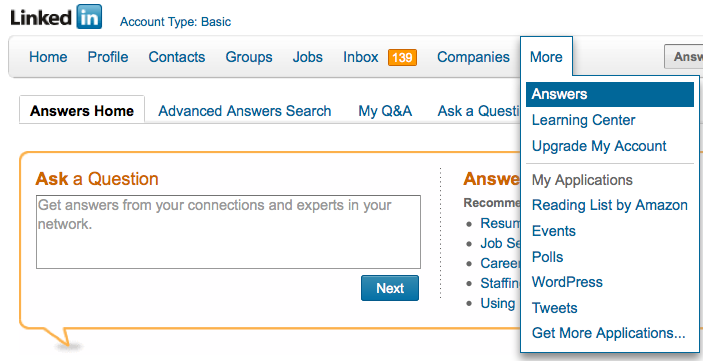
To find questions to answer, follow the MORE tab along LinkedIn’s top toolbar. Select Answers. (See the figure below.) To search based on topics (For example: Administration, Business Operations, Business Travel, Career and Education, Conferences and Event Planning, etc.), select Advanced Answers Search (right next to the Answers Home tab). Select the topics of interest and click on SEARCH.

Read through the questions, choose the ones you are interested in answering and reply in the form provided. LinkedIn allows you to suggest other LinkedIn contacts to answer the question and offers the opportunity to share a link in reply to a question. If you have a blog, you may consider replying via your blog and sharing the link. Or, you may already have a post that provides a good answer; share that link.) You can even reply privately to the questioner if you do not want your answer to be public.

Answering questions and demonstrating your expertise will help alert others in your industry and those interested in your work (whether you are a job seeker or entrepreneur) that you are willing and able to serve as an expert. In fact, I connected with my very first online client after answering some career oriented questions and hired my first web developer after he answered my question

One way to keep track of questions you might want to answer is to subscribe to the RSS feed of a topic of interest. If you are not familiar, RSS stands for really simple syndication. It is a way to receive information either via a “reader” or in your email, so you don’t need to personally visit every website or blog you enjoy to see if there is new information (or a new question). Common Craft has a great video to describe RSS.

(If you don’t use a feed reader already, maybe it is time! I use iGoogle, which you can use by signing up via your Google account. The video points out how to get started.)

Here’s how to subscribe to LinkedIn’s Answers:

From LinkedIn’s top toolbar, select MORE, then select ANSWERS.

Scroll down…

On the right side of the screen, you will see a column called BROWSE.

Select any topic from the list. (For example, “LAW AND LEGAL”).

Once you selected it, scroll down again.

At the bottom of the column, it will now have a little orange RSS symbol (shown to the right) and it should say:

Subscribe to new question in:

Law and Legal

Click on it.

Select the feed reader you use, for example, I use GOOGLE.

Choose to add to your reader or your homepage.

You’re done!

Subscribe to as many as you’d like, or  just plan some time every week to review questions in LinkedIn.

Stay tuned for more ways to demonstrate your expertise and stand a head above the rest!

Filed Under: Career Advice, Networking, Social Networking Tagged With: how to find a job, how to market your expertise, how to subscribe to LinkedIn's answers section, job search, keppie careers, linkedin, LinkedIn for job search, Miriam Salpeter, Personal Branding, small business owners

Important LinkedIn change impacts job seekers

December 10, 2010 By Miriam Salpeter

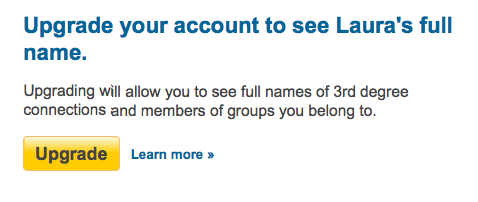
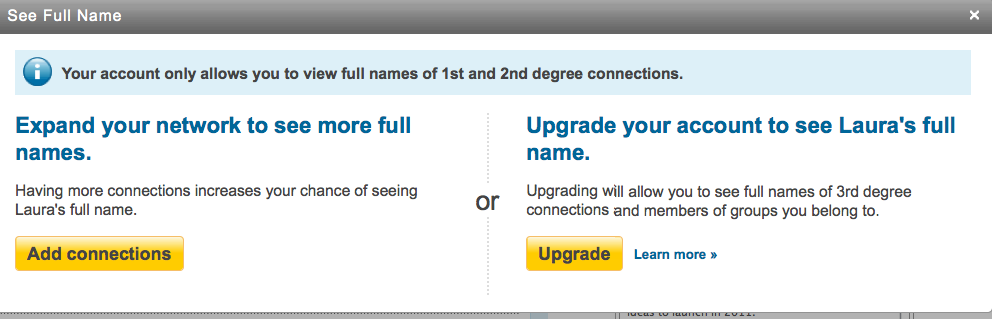
Watching changes in social networking platforms and keeping up-to-date on their ever-changing tools can be a full-time job. My colleague, Jason Alba, author of I’m On LinkedIn, Now What?, posted yesterday about a new development in LinkedIn search that is important for job seekers. He explains that when a non-paying LinkedIn user reviews a third-degree connection’s profile, LinkedIn does not share that person’s name in the headline. (It lists the first name and last initial — see photo below/right). 

It then prompts the user with two choices:

1. To expand your network to enhance your opportunity to connect with the user at a second-degree level. (This would be free, but takes effort.)

2. To upgrade to a paid account that will allow the person to easily find full names for third-degree contacts

This is an interesting development, and Jason notes that it probably is a precursor for other, similar moves by LinkedIn to withhold information and potentially encourage more people to become paid members.

However, at this point, LinkedIn really does not have the upper hand in preventing people from identifying full contact information or names of those whose last names it may withhold. I can (at this point) still see the entire actual profile of my third-degree connections (sans last name in the headline). Any information they share in their profiles (including listing an email address or full name in their profile or Summary section, their personal websites, Twitter accounts, Slideshares, etc.) is still readily available.

My advice to job seekers (and everyone who wants to make it easy — and free) for people to know who you are? Include your full name in your Summary section, link your other professional websites and social networks that have links to your work or work products and consider sharing an email in the context of your Summary.

While it is possible that LinkedIn will become draconian and try to prevent us from sharing this information, or that it will set things up so we cannot easily access other identifying information (such as Twitter account, websites, etc.), that is not the case right now.

Help someone find you by updating your profile. And, consider having your own social resume — a website that you control to share information you want people to know about you. Contact me if you’re interested in owning YourName.com, but could use some help creating a fully operational site that search engines will love and will showcase your best professional information!

Filed Under: social media, Social Networking Tagged With: how to find a job, how to write a LinkedIn profile, Jason Alba, job search, keppie careers, linkedin, Miriam Salpeter

The secret to effective job search

December 1, 2010 By Miriam Salpeter

Today’s post is one of many from members of the Career Collective community I co-coordinate with my colleague Jacqui Barrett-Poindexter. I encourage you to visit other members’ responses, which are linked at the end of my post. Please follow our hashtag on Twitter: #careercollective.

This month’s question focuses on common job search misconceptions. Unfortunately, “confused” is how job seekers often feel. They want to know the “right” way to apply for a job, what exactly their resume should say (and how it should look), whether or not anyone is reading their cover letter (should they even bother sending one?), when (and how often) to follow up…The list goes on and on.

However, I think the most important point that confuses job seekers is that the job search is not really about them. Nor is the resume, application, follow-up notes…None of it is about the job seeker.

The secret to successful job hunting? It’s about the employer.

If you are looking for a job, you need to research organizations and target your materials and networking efforts to appeal to them. You used XY skill at ABC place? That’s great, but what does it have to do with the job you want NOW? Everything on your resume and other communication (social media, in-person networking, etc.) needs to be geared to the employer’s interests and needs. Think of the employer as a spoiled child who wants everything his/her way. Avoid the temper tantrum in this case (which may be YOUR tantrum): give the employer what he needs to see. Convince her that you are the ONE candidate who is qualified and can do the job.

I’ve recently shared information about how to target your resume using keywords. Do that. If you are qualified for the position, you should be able to tweak and target your resume to appeal to your audience and land the interview.

When it comes to your resume, do your research to identify the employer’s salient points. For example, a manager may find that employers need candidates who have the following skills:

  • Mentoring/supervisory skills,
  • Diplomacy/communication
  • Leadership and
  • Specific subject matter expertise.

Once you identify the important skills – write the resume to identify and PROVE you are the candidate with the goods. When someone else reads the resume, will that person see proof of the necessary skills? Does the resume include accomplishments related to each of the points? It is not unusual to see a resume that states something but fails to prove it in the body of the resume. Any point that you are not supporting with evidence in your resume is a lost opportunity to drive home your point to the hiring manager.

Stop focusing on you and your needs – think about what someone else will be thinking when they encounter your materials or meet you. It’s the secret to job hunting successfully: it’s not about you.

Don’t miss my colleagues’ responses to this topic:

  • 5 Misconceptions Entry-Level Job Seekers Make, @heatherhuhman
  • How “Interview Savvy” Are You?, @careersherpa
  • Employers Don’t “Care”, @ValueIntoWords
  • Misconceptions about Using Recruiters, @DebraWheatman
  • 15 Myths and Misconceptions about Job-Hunting, @KatCareerGal
  • Are You Boring HR? @resumeservice
  • Job Search Misconceptions Put Right, @GayleHoward
  • Who Cares About What You Want in a Job? Only YOU!, @KCCareerCoach
  • How to get your resume read (sort of), @barbarasafani
  • The 4 secrets to an effective recruiter relationship, @LaurieBerenson
  • Job Interviews, Chronic Illness and 3 Big Ideas, @WorkWithIllness
  • The secret to effective job search, @Keppie_Careers
  • Superstars Need Not Apply, @WalterAkana
  • The Jobs Under the Mistletoe, @chandlee
  • 8 Common Sense Interview Tips @erinkennedycprw
  • Still no job interview? @MartinBuckland @EliteResumes
  • Misconceptions about the Hiring Process: Your Online Identity is a Critical Part of Getting Hired, @expatcoachmegan

photo by Tambako the Jaguar

Filed Under: Career Advice, Resume Advice Tagged With: Career Advice, career coach, Career Collective, confused job seeeker, how to find a job, job search, keppie careers, Miriam Salpeter, secret to job search

Feeling stuck in your job search?

December 1, 2010 By Miriam Salpeter

I want to thank my friend Jane Pollak for sharing a funny video that illustrates how I think a lot of job seekers feel today – stuck! However, as the video demonstrates, sometimes, feeling stuck is really just that – a feeling. Looking for a job can be frustrating, but there is a lot that you do control. You really do drive your own career bus.

I hope this video makes you chuckle, but if you are feeling stuck, I hope it also helps you recognize that you CAN start to put one foot in front of the other and get your job search strategy moving!

If you need some help to get started, that’s my specialty! Need a resume transformation? A social resume? An online presence? Some guidance about what to do next, or how to get started? Contact me for information.

(Excuse the ad. I couldn’t resist posting this, though.)

photo by xJasonRogersx

Filed Under: Career Advice Tagged With: career coach, Jane Pollak, job search, keppie careers, Miriam Salpeter, what to do if you are stuck

  • « Go to Previous Page
  • Page 1
  • Interim pages omitted …
  • Page 4
  • Page 5
  • Page 6
  • Page 7
  • Page 8
  • Interim pages omitted …
  • Page 30
  • Go to Next Page »

Follow Us!

  • Facebook
  • Instagram
  • LinkedIn
  • Pinterest
  • Twitter

Be an Insider: Sign Up to Receive Special Offers & Free Gift


About Keppie Careers

Are you a job seeker or business owner? You’ve come to the right place!
Click here to find out more.

Contact Us

Have a question or comment?
Click here to Contact Us.
© Copyright 2024 Keppie Careers