• Skip to primary navigation
  • Skip to main content
  • Skip to footer

Keppie Careers

Social media speaker, social media consultant, job search coach

  • About
    • Expert Job Search and Social Media Consultant / Speaker
  • Services
    • For Job Seekers
    • For Entrepreneurs
    • Social Media Coaching and Consulting
    • Speaking/Keynotes
  • Resources
    • Sample Resumes
    • Quoted In
  • Books
  • Blog
  • Contact

What one person’s bad luck shows about the power of Twitter

March 18, 2011 By Miriam Salpeter

No doubt getting fired for something said, posted or tweeted often makes the news. This week in Atlanta, Chadd Scott, a radio personality, lost his job for tweeting disparaging things about Delta Airlines, an Atlanta based company that also happened to be a key client for the station where Chadd worked. 11 Alive News, the NBC affiliate in Atlanta, reported Delta threatened to pull their ads from the station. 680 The Fan Radio fired him for tweeting comments such as:

“The bean counter who saved Delta a few bucks in st. lou hoping he wouldn’t need more de-icing fluid this year screwed a lot of people today.”

“Not a big quote tweeter, but #delta should remember ‘when you fail 2 prepare, you prepare 2 fail.'”

“New #delta strategy on de-icing planes in st. louis: wait ’til it melts. well, the company is based in atlanta.”

While it’s unfortunate these tweets landed Chadd in such hot water, the most important lesson job seekers can learn from this story: companies ARE listening! It’s possible to get someone’s attention via Twitter, and to use it to your advantage.

11 Alive reporter Jaye Watson interviewed me about what Chadd did wrong and how people can use Twitter to attract positive attention.

picture by xotoko

Filed Under: Career Advice, social media Tagged With: career coach, Chadd Scott, fired for tweeting, how to get a job using Twitter, Jaye Watson, keppie careers, Miriam Salpeter, social media coach, Twitter

Newest updates from LinkedIn

March 10, 2011 By Miriam Salpeter

I was delighted to be invited to attend LinkedIn’s latest press conference (via live stream from their headquarters). No question LinkedIn is working hard to compete with other, growing social networks, such as Facebook and Twitter.

An interesting point made in the early part of the conference: LinkedIn wants to emphasize itself as a network helpful for job seekers, but not JUST for people looking for jobs. They strive to be a place for people to share insights, build relationships  and update profiles to illustrate expertise and offer information all of the time. I’ve been promoting this concept for years, and it was not surprising to know that being a go-to network for every professional is one of LinkedIn’s goals.

The three objectives they outlined:

  1. Be the professional profile of record to help people find and be found, ultimately eliminating the need for the “cold call.”
  2. Be a source of professional insights with a focus on making content relevant to readers.
  3. “Work where our members work,” in other words, create applications to use via smartphones and on the go in addition to on the Web.

Some of their latest – and newly announced features:

LinkedIn’s InMaps – allow you to visualize your LinkedIn social graph (the people you are connected to and how they connect to each other). You can learn where there are pockets in your networks and consider where you may want to expand your connections, and it’s all via a visual tool. (The picture above is a piece of an InMap. Try it out: http://inmaps.linkedinlabs.com/.

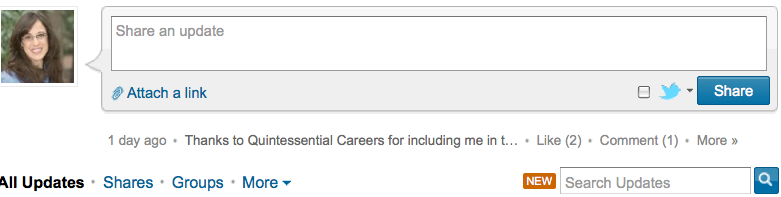
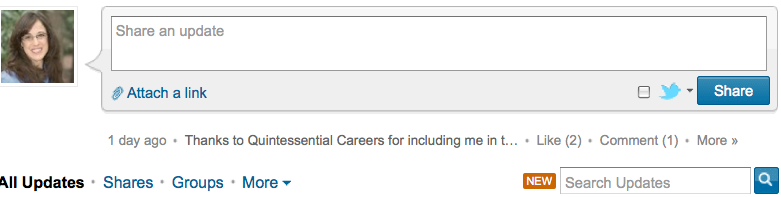
LinkedIn’s Signal – This has been in beta in September 2010, and today is available for everyone. Find this on your LinkedIn home page or via http://www.linkedin.com/signal. (See picture below — the link is in the bottom, right corner – Search Updates.)


See updates from your immediate or expanded network, or information shared by company or industry, location, time, University, or any combination of those search parameters. This gives you access to updates from people who are not in your network.

This search is sort of similar to searching a hashtag on Twitter, which shows you updates from everyone – not just your network – using that search term. LinkedIn aims to share “professional” updates with you via this tool, but this all depends on how your network or the network you are searching uses LinkedIn. Let’s face it, there are plenty of updates that are not exactly “professional.” I found many by searching only by city. However, in theory, this type of search should clue me in to what professionals in a given city are thinking and sharing. (Searches by industry are more focused and will likely produce useful results.)

LinkedIn Today Beta. Find this at http://www.linkedin.com/today. LinkedIn calls it, “A new product that surfaces the top headlines and stories being shared the most across multiple industries by LinkedIn’s trusted network of more than 90 million professionals.”

They explain, “LinkedIn Today gives members a customized and tailored way to consume the top trending news relevant to a particular industry and by what is being shared the most frequently by those industry’s professionals. It lets members access their professional news through three different lenses – by their connections, industry, and the broader global professional network.”

LinkedIn Today integrates with Twitter and StumbleUpon and other news sources, including Bloomberg.com, Wall Street Journal Digital Network, CNNMoney, and many more. They also integrated this into their iPhone app (version 3.6), which has special features allowing users to quickly access the news they need.

Learn more about this new feature by taking the “tour” offered right below the site’s headline. It’s easy to personalize the experience and save stories so you can track the information you want.

Be sure to take advantage of these useful tools, whether you are looking for a job, have a business, or just know you need to keep up-to-date to stay ahead of the game professionally!

Want to learn all about how you can use social networking to propel your career? My new book, Social Networking for Career Success, is available for pre–order (at a great price). I want to invite you to order now!

Filed Under: Job Hunting Tools, Networking, social media, Social Networking Tagged With: career coach, how social media helps job seekers, how to use LinkedIn Signal, how to use LinkedIn Today, keppie careers, LinkedIn InMaps, LinkedIn Today, LinkedIn updates, Miriam Salpeter, social media

LinkedIn adds new functionality to ‘Company’ search

February 26, 2011 By Miriam Salpeter

LinkedIn’s blog reported yesterday that you can now search “for companies not only by attributes such as location, industry, and size but also by how you are connected. You can filter a set of results to include only those companies where you have a direct connection or broaden your search to include companies in your extended network.”

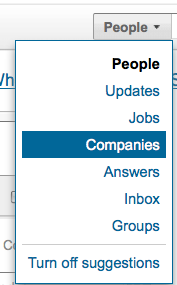
Hopefully, you have already been following companies (read more about following companies on LinkedIn here), but this is a pretty neat improvement. All you need to do is go to the top toolbar, select companies (see picture) and include keywords (which could be city, industry, etc.). LinkedIn finds a list of companies with your criteria where you have connections in your network. LinkedIn links you to those contacts and lets you know which companies currently list jobs in LinkedIn.

You’ll also have a chance to follow the company, which helps you track what is going on there. Take a look at LinkedIn’s video describing the new search function:

http://www.youtube.com/watch?v=1j5VoN_v-Us&feature=player_embedded

I think job seekers (or anyone thinking of making a change) will find this new functionality extremely useful! Be sure to keep up with The LinkedIn blog for updates.


Filed Under: Job Hunting Tools, social media Tagged With: career coach, how to find a job, how to use linkedin to find a job, keppie careers, linkedin, Miriam Salpeter, social media coach

Why you need your own website – and how to get one!

February 20, 2011 By Miriam Salpeter

Do you believe you need an online presence to help you land a job — or to help you manage your career? I spent 45 minutes last week trying to convince a career-changing friend she needed HerName.com. She is finishing an advanced degree and will be looking for opportunities in a teaching specialty. She can’t understand why it is important to have an online presence, and she made some good points:

  • I’m going to get a job because my professor recommends me to a colleague; it doesn’t have anything to do with having a website.
  • I’m not comfortable having information about me online that just anyone can find.

I tried my go-to reasons to explain why her own site was a good idea:

  • Even if your professor recommends you for the job, it’s likely the hiring manager will also Google you. What will she find?
  • A personal site is a way to control how your name appears online.
  • Statistics show your online presence matters, and that employers are looking for personal and professional data about you.
  • In fact, while you may think you have “privacy” online, NOT putting up your own site only gives people an incentive to look deeper in the web for information about you. Take a look at these sites to learn what the “deep web” knows about you: pipl.com, Polymeta.com.
  • Managing a site is important for career insurance and professional development. Showcasing your expertise online (even if it is in a new field) helps demonstrate what you have to offer, even when you aren’t looking for a job. An online presence can grow and change along with your career and help attract people to learn more about you. This could result in opportunities to speak at conferences or events, or even invitations to apply for jobs down the road.

None of this persuaded her. Finally, I came up with one last point…Something I’ve written about, but hadn’t thought to bring up during our conversation:

  • Having a website suggests you have some technical savvy and understand how to use online tools to communicate. That, in and of itself, is an important skill many employers value. It’s known as “social proof.” You may say you know about technology on your resume, but actually using it to showcase your own information goes a long way to prove you have what employers want.

Finally! She replied…”I can see how that would be important.” Noting technology in the classroom is key, and knowing how to use it could be useful, she acknowledged the “social proof” argument was more persuasive than anything else I said.

Especially if you are transitioning to a new job or an experienced job seeker who needs to overcome age discrimination, having an up-to-date online presence and maybe even a viable blog helps show prospective employers you’re willing to learn and are perfectly capable of keeping up with technology.

Maybe you, like my friend, are skeptical. You can’t envision how and why having an online presence will help you get a job, manage your career or become known as an expert in your field. Since I spend so much of my time keeping up with job search strategies and researching tools job seekers and careerists need to use, it’s so clear to me that having YourName.com is crucial to your professional identity and to managing your career.

That’s why I created a product/service to help people (even the skeptical ones) secure and manage their own websites. I’m giving it away for a steal (a colleague told me I should be charging $1000+). Think about how your investment can help you move in the right direction for your career and visit my new site to learn how to get a social resume: http://www.getasocialresume.com/.

photo by nyuudo

Filed Under: Job Hunting Tools, Resume Advice, social media, Social Networking Tagged With: career coach, get a job, how to find a job, Miriam Salpeter, social resume, why you need an online presence

You need a social resume. Get one here!

February 2, 2011 By Miriam Salpeter

You’re a job seeker or a small business owner. You know you need an optimized online presence, but it’s too important to go it alone. Today, I am launching a new product – a social resume or “YourName.com.”

When we are finished, you will have a website with a custom URL and an online “home” to let employers or customers know what you offer. Having a website helps you control what Google knows about you.

Microsoft found, “79 percent of United States hiring managers and job recruiters surveyed reviewed online information about job applicants. Additionally, 70 percent of United States hiring managers in the study said they have rejected candidates based on what they found.” When you have your own site, you seize some control over what people find when they google your name.

Let me help put YOU in the driver’s seat to steer your reputation from a position of strength!

YOUR SITE WILL:

  • Link you to a community of colleagues, experts and potential mentors.
  • Provide opportunities to expand your network, instigate two-way communication and meet new people from around the world.
  • Help you further define your message and potentially become known as a subject matter expert.
  • Serve as a 3-D portfolio of your work.
  • Influence how Google and other search engines index your name, and therefore what people find when they search for you.

Learn more about how to get your social resume.

steering wheel photo by NateBW

Filed Under: social media, Social Networking Tagged With: career coach, get a job, how to influence what google says about you, keppie careers, Miriam Salpeter, online profile, social resume

  • « Go to Previous Page
  • Page 1
  • Interim pages omitted …
  • Page 9
  • Page 10
  • Page 11
  • Page 12
  • Page 13
  • Interim pages omitted …
  • Page 16
  • Go to Next Page »

Follow Us!

  • Facebook
  • Instagram
  • LinkedIn
  • Pinterest
  • Twitter

Be an Insider: Sign Up to Receive Special Offers & Free Gift


About Keppie Careers

Are you a job seeker or business owner? You’ve come to the right place!
Click here to find out more.

Contact Us

Have a question or comment?
Click here to Contact Us.
© Copyright 2024 Keppie Careers