• Skip to primary navigation
  • Skip to main content
  • Skip to footer

Keppie Careers

Social media speaker, social media consultant, job search coach

  • About
    • Expert Job Search and Social Media Consultant / Speaker
  • Services
    • For Job Seekers
    • For Entrepreneurs
    • Social Media Coaching and Consulting
    • Speaking/Keynotes
  • Resources
    • Sample Resumes
    • Quoted In
  • Books
  • Blog
  • Contact

How to ask for LinkedIn recommendations

January 16, 2011 By Miriam Salpeter

You’ve probably seen it on LinkedIn — “6 people have recommended Bill,” or “16 people have recommended Sue.” Having at  recommendations on LinkedIn will help people recognize your strengths.

There are a few best practices when it comes to asking for recommendations on LinkedIn:

  • It is not not necessarily better to have a lot of endorsements. You don’t need 58 recommendations. In fact, some people say that they are suspicious when people have what they consider excessive numbers of endorsements. I was once conducting a workshop, and a participant found a colleague who had a lot of recommendations — I can’t remember exactly how many, but a lot! She said, “Wow, that’s impressive.” Upon further investigation, each recommendation was reciprocal — that is, she had endorsed everyone who endorsed her. All of the sudden, it seemed less impressive. Which leads us to…
  • Be sure not all of your recommendations are “you endorse me and I’ll endorse you.”

It’s easy to ask for a recommendation on LinkedIn. (Maybe a little too easy!) All you need to do is click through to “Privacy and Settings” and under the “Profile” tab, click “Manage Your Recommendations.”  Click “Ask for Recommendations” on the top toolbar. Then, you can choose the job you want a recommendation for and select people to ask for the endorsement.

Here are some tips to get the best recommendations possible:

  • NEVER ask more than one person per message. Each recommendation request should be personalized and specific to the endorser.
  • Recognize the most people have no idea what to say and can use some guidance. It is your job to help steer your recommenders along the right path. For example:

“I am updating my LinkedIn profile, and I’d be honored if you would write a recommendation for me. While I am not currently looking for a job, the skills most important in my field include:  customer service/communication abilities, being self-directed and deadline-driven, as well as paying attention to details and having an inquisitive nature. I hope you will be able to comment on any of those in your note. I have an updated LinkedIn profile if you’d like to review it.”

If you need help updating your LinkedIn profile, contact me!

Providing information that helps your colleague or former supervisor know what you want him or her to say goes a long way to ensuring a) he or she actually writes out a reply and b) the recommendation has information that is actually useful to you.

It’s up to you to steer your career and job search related information. Follow these links for additional information about asking for recommendations:

Be sure to vet your references.

10 tips to land the best work references

Keep in touch with job references.

Prepare your references for job search success.

photo by .michael.newman.

Filed Under: social media, Social Networking Tagged With: asking for recommendations, career coach, how to get a jb, how to use linkedin, keppie careers, linkedin, Miriam Salpeter, references for a job search

2 Reasons you should not be looking for a job

January 12, 2011 By Miriam Salpeter

It may be unexpected advice from a job search coach, but ideally you should not be looking for a job. Here’s why you need to get off those job boards and readjust your approach:

1. Instead of searching for a job, find a problem you can solve.

This is a proactive approach, and forces you to network and interact with a variety of people and to research problems facing organizations requiring your expertise. Identify thought leaders in your field and begin to insert yourself in their conversations. (One good tip is to discover and read blogs targeting your industry. Check Alltop.com for a great list or use Google’s blog search.)

Trying to find a problem to solve instead of a job requires you to consciously identify skills you plan to use in your next opportunity and to outline your accomplishments. If you stop searching for a job and start paying attention to what you have to offer, you will recognize you control more than you may have realized when it comes to your search.

Read the rest on my NEW, weekly blog on U.S. News & World Report’s Careers site…

Don’t Look for a Job – Make the Job Come to You


Photo by Jeffrey Beall

Filed Under: Career Advice Tagged With: career coach, don't look for a job, how to find a job, keppie careers, Miriam Salpeter, resume writing, U.S. News & World Report

How to find people on LinkedIn?

January 10, 2011 By Miriam Salpeter

I wrote about LinkedIn this week and about how to subscribe to RSS feeds for the Answers section. Before I published the post, my friend Hannah Morgan, AKA @careersherpa, contacted me to ask if I’d  contribute a suggestion to help readers find great people to connect with on LinkedIn.

There are so many great ways, but since I had LinkedIn’s Answers on the brain, I replied:

Using LinkedIn’s Answers is one way to expand  potential connections. Often, when I ask a question, people who answer it will request to connect, or if I answer a question, people who asked it may request that we “link in.” If you are asking and answering questions related to your field, you may “meet” people who could be great networking contacts you wouldn’t otherwise know.

A lot of our colleagues offered great ideas to help you find people via LinkedIn on Hannah’s blog. Be sure to visit CareerSherpa.com for all the suggestions!

photo by 99zeros

Filed Under: Career Advice, Social Networking Tagged With: career networking, Career Sherpa, Hannah Morgan, how to find a job, how to find people on Linkedin, how to grow your professional network, keppie careers, linkedin, Miriam Salpeter, professional networking

Job seekers and entrepreneurs: subscribe to LinkedIn’s Answers

January 9, 2011 By Miriam Salpeter

Whether you are currently looking for a job (or just thinking about beginning a job hunt) or if you are promoting your own business, it is important to do what you can to stand out of a crowd of people. U.S. News & World Report says there are statistically five unemployed people for every job, compared to an average of 1.7 people for every job in the three years before the recession.

One way to help you demonstrate your expertise is to share your thoughts via LinkedIn’s Answers section.

If you are not familiar, LinkedIn’s Answers offers a venue for people to ask and reply to questions about all different topics. The questions run the gamut; some seem silly, but others are quite serious. A quick review shows the following as current questions:

  • Is it time for the Cinema industry to rethink its business plan?
  • How will the recent tax bill effect solar and renewable energy finance?
  • Pick a letter in the alphabet and write a sentence using letters in the alphabet in order… Example: “A big cat does everything”…
  • Looking for virtual purchasing guest lecturers in GA 400 Corridor.

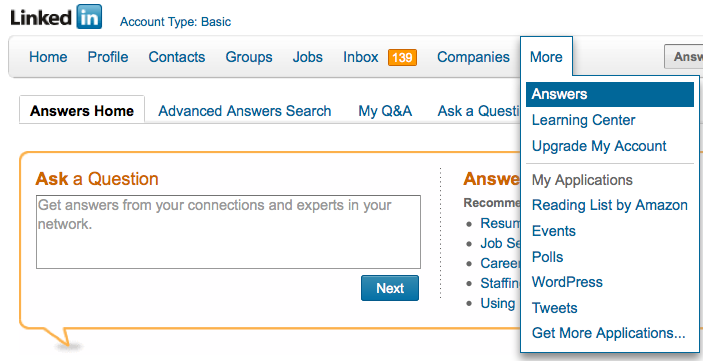
To find questions to answer, follow the MORE tab along LinkedIn’s top toolbar. Select Answers. (See the figure below.) To search based on topics (For example: Administration, Business Operations, Business Travel, Career and Education, Conferences and Event Planning, etc.), select Advanced Answers Search (right next to the Answers Home tab). Select the topics of interest and click on SEARCH.

Read through the questions, choose the ones you are interested in answering and reply in the form provided. LinkedIn allows you to suggest other LinkedIn contacts to answer the question and offers the opportunity to share a link in reply to a question. If you have a blog, you may consider replying via your blog and sharing the link. Or, you may already have a post that provides a good answer; share that link.) You can even reply privately to the questioner if you do not want your answer to be public.

Answering questions and demonstrating your expertise will help alert others in your industry and those interested in your work (whether you are a job seeker or entrepreneur) that you are willing and able to serve as an expert. In fact, I connected with my very first online client after answering some career oriented questions and hired my first web developer after he answered my question

One way to keep track of questions you might want to answer is to subscribe to the RSS feed of a topic of interest. If you are not familiar, RSS stands for really simple syndication. It is a way to receive information either via a “reader” or in your email, so you don’t need to personally visit every website or blog you enjoy to see if there is new information (or a new question). Common Craft has a great video to describe RSS.

(If you don’t use a feed reader already, maybe it is time! I use iGoogle, which you can use by signing up via your Google account. The video points out how to get started.)

Here’s how to subscribe to LinkedIn’s Answers:

From LinkedIn’s top toolbar, select MORE, then select ANSWERS.

Scroll down…

On the right side of the screen, you will see a column called BROWSE.

Select any topic from the list. (For example, “LAW AND LEGAL”).

Once you selected it, scroll down again.

At the bottom of the column, it will now have a little orange RSS symbol (shown to the right) and it should say:

Subscribe to new question in:

Law and Legal

Click on it.

Select the feed reader you use, for example, I use GOOGLE.

Choose to add to your reader or your homepage.

You’re done!

Subscribe to as many as you’d like, or  just plan some time every week to review questions in LinkedIn.

Stay tuned for more ways to demonstrate your expertise and stand a head above the rest!

Filed Under: Career Advice, Networking, Social Networking Tagged With: how to find a job, how to market your expertise, how to subscribe to LinkedIn's answers section, job search, keppie careers, linkedin, LinkedIn for job search, Miriam Salpeter, Personal Branding, small business owners

What does Starbucks’ new logo have to do with your job search?

January 6, 2011 By Miriam Salpeter

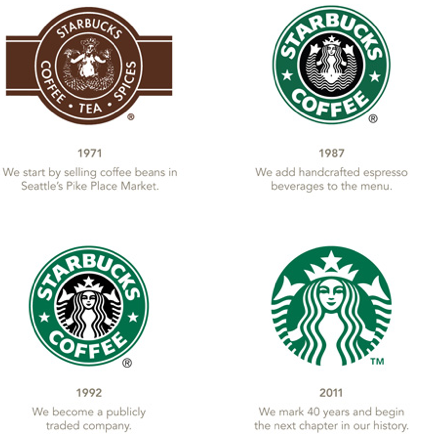
It’s all the buzz in the Twittersphere – Starbucks, the legendary coffee company – is changing its logo. As you can see in the image, the most recent transformation (bottom/right) leaves off the Starbucks name and seems to try to disassociate it from its coffee roots.

A Reuter’s article quotes Starbucks‘  Chief Executive Howard Schultz as saying, “Even though we have been, and always will be, a coffee company and retailer, it’s possible we’ll have other products with our name on it and no coffee in it.”

It’s not unusual for brand loyalists to revolt when a company makes a major change like this (for example, GAP recently ditched its new logo due to pressure on social media channels). But a new logo without the company name? That is an interesting move.

The Reuters article quoted James Gregory, chief executive of brand consulting firm CoreBrand:

“I think it’s nuts,” he said.  “What’s it going to be — the coffee formerly known as Starbucks?”

The new logo probably will not hurt cafe sales in the near term because most Starbucks customers are enthusiasts, Gregory said. But, he said, a nameless logo was a bad fit for Starbucks products sold by grocery stores and other retailers.

“There you’re dealing with people who aren’t enthusiasts. You’re looking at something that’s almost generic, and it’s not shouting out as something that is Starbucks.”

THAT (bolded) is the quote that really grabbed me, and convinced me to jump on the bandwagon and write about this issue. (Which, admittedly, as many on Twitter have noted, is not a matter of life and death.)

If you’re a typical job seeker, you can’t do what Starbucks is doing — go generic. They are banking on the fact that enough people recognize their logo and brand that they do not even need a name to go with it. Is that what you are doing? Maybe your resume and job search materials are okay if you already know the person you need to meet. (Akin to a Starbucks loyalist shopping in a grocery store who sees a new product, with the nameless logo, but automatically makes the association that it is a trusted brand’s item.)

Going generic is a big gamble, as Gregory noted in his comments. It might work for current customers/people who already are “sold” on you, but, unfortunately, job hunting today is more about impressing the people who DON’T know you already. The people who are NOT already your fans. What are you doing with your materials (and your networking efforts) to impress them?

This situation is a great reminder to job seekers and everyone planning to manage a successful career: look at YOUR materials (they are, essentially, your logo). Look at your resume, LinkedIn profile, social networking bios — are you generic? If you have not already built a name for yourself to the point that employers are knocking on your door, you cannot afford the equivalent of a logo with no name. (It’s possible that it’s not even a good idea for an otherwise very established brand like Starbucks; only time will tell.)

Stay tuned to the blog for tips and tricks to help you stand out online and in person! (And maybe a blog about how Starbucks may be trying to do the equivalent of a career change — and what you can learn from that!)

Filed Under: Career Advice, Encore Careers, Personal Branding Tagged With: are you a generic job seeker, career change, how to find a job, job search tips, keppie careers, logo change, Miriam Salpeter, social resume, Starbucks

  • « Go to Previous Page
  • Page 1
  • Interim pages omitted …
  • Page 93
  • Page 94
  • Page 95
  • Page 96
  • Page 97
  • Interim pages omitted …
  • Page 185
  • Go to Next Page »

Follow Us!

  • Facebook
  • Instagram
  • LinkedIn
  • Pinterest
  • Twitter

Be an Insider: Sign Up to Receive Special Offers & Free Gift


About Keppie Careers

Are you a job seeker or business owner? You’ve come to the right place!
Click here to find out more.

Contact Us

Have a question or comment?
Click here to Contact Us.
© Copyright 2024 Keppie Careers