• Skip to primary navigation
  • Skip to main content
  • Skip to footer

Keppie Careers

Social media speaker, social media consultant, job search coach

  • About
    • Expert Job Search and Social Media Consultant / Speaker
  • Services
    • For Job Seekers
    • For Entrepreneurs
    • Social Media Coaching and Consulting
    • Speaking/Keynotes
  • Resources
    • Sample Resumes
    • Quoted In
  • Books
  • Blog
  • Contact

Newest updates from LinkedIn

March 10, 2011 By Miriam Salpeter

I was delighted to be invited to attend LinkedIn’s latest press conference (via live stream from their headquarters). No question LinkedIn is working hard to compete with other, growing social networks, such as Facebook and Twitter.

An interesting point made in the early part of the conference: LinkedIn wants to emphasize itself as a network helpful for job seekers, but not JUST for people looking for jobs. They strive to be a place for people to share insights, build relationships  and update profiles to illustrate expertise and offer information all of the time. I’ve been promoting this concept for years, and it was not surprising to know that being a go-to network for every professional is one of LinkedIn’s goals.

The three objectives they outlined:

  1. Be the professional profile of record to help people find and be found, ultimately eliminating the need for the “cold call.”
  2. Be a source of professional insights with a focus on making content relevant to readers.
  3. “Work where our members work,” in other words, create applications to use via smartphones and on the go in addition to on the Web.

Some of their latest – and newly announced features:

LinkedIn’s InMaps – allow you to visualize your LinkedIn social graph (the people you are connected to and how they connect to each other). You can learn where there are pockets in your networks and consider where you may want to expand your connections, and it’s all via a visual tool. (The picture above is a piece of an InMap. Try it out: http://inmaps.linkedinlabs.com/.

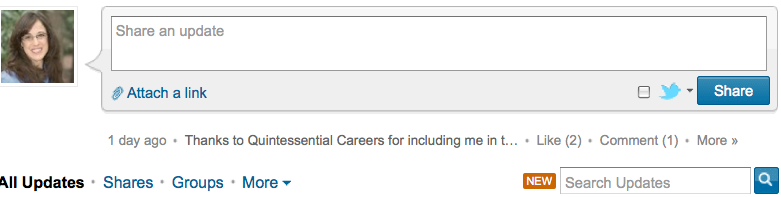
LinkedIn’s Signal – This has been in beta in September 2010, and today is available for everyone. Find this on your LinkedIn home page or via http://www.linkedin.com/signal. (See picture below — the link is in the bottom, right corner – Search Updates.)
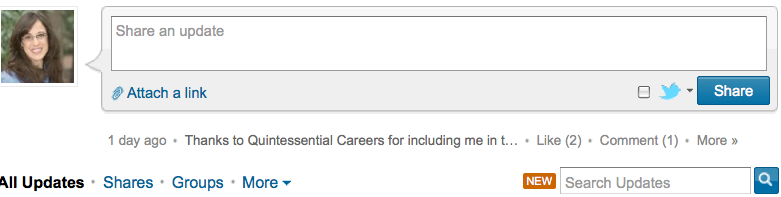

See updates from your immediate or expanded network, or information shared by company or industry, location, time, University, or any combination of those search parameters. This gives you access to updates from people who are not in your network.

This search is sort of similar to searching a hashtag on Twitter, which shows you updates from everyone – not just your network – using that search term. LinkedIn aims to share “professional” updates with you via this tool, but this all depends on how your network or the network you are searching uses LinkedIn. Let’s face it, there are plenty of updates that are not exactly “professional.” I found many by searching only by city. However, in theory, this type of search should clue me in to what professionals in a given city are thinking and sharing. (Searches by industry are more focused and will likely produce useful results.)

LinkedIn Today Beta. Find this at http://www.linkedin.com/today. LinkedIn calls it, “A new product that surfaces the top headlines and stories being shared the most across multiple industries by LinkedIn’s trusted network of more than 90 million professionals.”

They explain, “LinkedIn Today gives members a customized and tailored way to consume the top trending news relevant to a particular industry and by what is being shared the most frequently by those industry’s professionals. It lets members access their professional news through three different lenses – by their connections, industry, and the broader global professional network.”

LinkedIn Today integrates with Twitter and StumbleUpon and other news sources, including Bloomberg.com, Wall Street Journal Digital Network, CNNMoney, and many more. They also integrated this into their iPhone app (version 3.6), which has special features allowing users to quickly access the news they need.

Learn more about this new feature by taking the “tour” offered right below the site’s headline. It’s easy to personalize the experience and save stories so you can track the information you want.

Be sure to take advantage of these useful tools, whether you are looking for a job, have a business, or just know you need to keep up-to-date to stay ahead of the game professionally!

Want to learn all about how you can use social networking to propel your career? My new book, Social Networking for Career Success, is available for pre–order (at a great price). I want to invite you to order now!


Filed Under: Job Hunting Tools, Networking, social media, Social Networking Tagged With: career coach, how social media helps job seekers, how to use LinkedIn Signal, how to use LinkedIn Today, keppie careers, LinkedIn InMaps, LinkedIn Today, LinkedIn updates, Miriam Salpeter, social media

5 things you haven’t tried to help you land a job

February 7, 2011 By Miriam Salpeter

I know how frustrating it is for job seekers who think they are  “doing everything they can,” but still can’t land a job. It’s empowering to realize there are probably strategies you have not tried and new, assertive approaches to expanding your network and landing a job.

Here are five things you may not have tried that can make a difference:

1.     Seek speaking opportunities. Even if you are not employed, if you are an expert in a subject matter, you should be able to identify organizations interested in hearing you speak. Start locally by finding the Kiwanis and Chamber of  Commerce in your area. Identify local chapters of your profession’s organizations. Join, attend regular meetings, and volunteer to share what you know about topics that interest the membership.

Toastmasters groups are terrific places to practice your presentation skills if you are not a natural public speaker. In addition to improving your communication skills, participating in Toastmasters will naturally expand your professional reach and potentially result in some great contacts.

Benefit: Speaking in front of a group automatically provides you credibility. When you deliver useful information or new ideas, you solidify your position as an expert in the topic. The combination of these could help you literally find the perfect audience for your job search.

Read the rest on my weekly U.S. News & World Report column

photo by owaief89

Filed Under: Job Hunting Tools, Networking Tagged With: 5 things to help you land a job, get a social resume, have your own website, how to find speaking opportunities, how to get a job, keppie careers, Miriam Salpeter, Quora, U.S. News & World Report, YourName.com

Job seekers and entrepreneurs: subscribe to LinkedIn’s Answers

January 9, 2011 By Miriam Salpeter

Whether you are currently looking for a job (or just thinking about beginning a job hunt) or if you are promoting your own business, it is important to do what you can to stand out of a crowd of people. U.S. News & World Report says there are statistically five unemployed people for every job, compared to an average of 1.7 people for every job in the three years before the recession.

One way to help you demonstrate your expertise is to share your thoughts via LinkedIn’s Answers section.

If you are not familiar, LinkedIn’s Answers offers a venue for people to ask and reply to questions about all different topics. The questions run the gamut; some seem silly, but others are quite serious. A quick review shows the following as current questions:

  • Is it time for the Cinema industry to rethink its business plan?
  • How will the recent tax bill effect solar and renewable energy finance?
  • Pick a letter in the alphabet and write a sentence using letters in the alphabet in order… Example: “A big cat does everything”…
  • Looking for virtual purchasing guest lecturers in GA 400 Corridor.

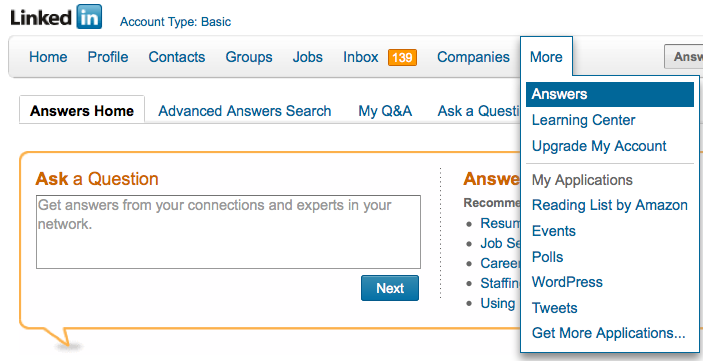
To find questions to answer, follow the MORE tab along LinkedIn’s top toolbar. Select Answers. (See the figure below.) To search based on topics (For example: Administration, Business Operations, Business Travel, Career and Education, Conferences and Event Planning, etc.), select Advanced Answers Search (right next to the Answers Home tab). Select the topics of interest and click on SEARCH.

Read through the questions, choose the ones you are interested in answering and reply in the form provided. LinkedIn allows you to suggest other LinkedIn contacts to answer the question and offers the opportunity to share a link in reply to a question. If you have a blog, you may consider replying via your blog and sharing the link. Or, you may already have a post that provides a good answer; share that link.) You can even reply privately to the questioner if you do not want your answer to be public.

Answering questions and demonstrating your expertise will help alert others in your industry and those interested in your work (whether you are a job seeker or entrepreneur) that you are willing and able to serve as an expert. In fact, I connected with my very first online client after answering some career oriented questions and hired my first web developer after he answered my question

One way to keep track of questions you might want to answer is to subscribe to the RSS feed of a topic of interest. If you are not familiar, RSS stands for really simple syndication. It is a way to receive information either via a “reader” or in your email, so you don’t need to personally visit every website or blog you enjoy to see if there is new information (or a new question). Common Craft has a great video to describe RSS.

(If you don’t use a feed reader already, maybe it is time! I use iGoogle, which you can use by signing up via your Google account. The video points out how to get started.)

Here’s how to subscribe to LinkedIn’s Answers:

From LinkedIn’s top toolbar, select MORE, then select ANSWERS.

Scroll down…

On the right side of the screen, you will see a column called BROWSE.

Select any topic from the list. (For example, “LAW AND LEGAL”).

Once you selected it, scroll down again.

At the bottom of the column, it will now have a little orange RSS symbol (shown to the right) and it should say:

Subscribe to new question in:

Law and Legal

Click on it.

Select the feed reader you use, for example, I use GOOGLE.

Choose to add to your reader or your homepage.

You’re done!

Subscribe to as many as you’d like, or  just plan some time every week to review questions in LinkedIn.

Stay tuned for more ways to demonstrate your expertise and stand a head above the rest!

Filed Under: Career Advice, Networking, Social Networking Tagged With: how to find a job, how to market your expertise, how to subscribe to LinkedIn's answers section, job search, keppie careers, linkedin, LinkedIn for job search, Miriam Salpeter, Personal Branding, small business owners

How to access the hidden job market

November 16, 2010 By Miriam Salpeter

I’m fortunate to live in the Atlanta area, where there is an active and talented, social media savvy recruiter community. I’m lucky to be able to meet these recruiters “in real life,” or as my friend Phyllis Mufson says, “in 3D.” One such recruiter is Jim Stroud. Jim is well known in the field for his work as a “Searchologist” (someone adept at online research), with an expertise in the full life-cycle placement of Executive and Technical personnel, Recruitment Research and Competitive Intelligence. What does all that mean? He has a lot of ideas about how to teach job seekers about how recruiters think.

While not everyone is going to find a job via a recruiter, I think his video about how to access the hidden job market is worth every job seeker’s time. This is what he says about the video:

Did you know that traditional job searches leave you at a disadvantage? Why? Simply put, there are a lot of unadvertised jobs that you are overlooking everyday. If you do not know about these hidden jobs. its because you have been looking in the wrong places. Its time to do something different! In this video on job search strategy, Jim Stroud gives tips on how to prospect the hidden job market. Tune in now and PLEASE share with other job seekers in your network.

Jim asked me to share this, so here it is. Let me know what you think, and be sure to be in touch if you’d like help implementing Jim’s suggestions. If you are ready for a social resume that gets results (and is optimized for search), contact me!

How To Find Hidden Jobs from Jim Stroud on Vimeo.

Filed Under: Career Advice, Networking, Resume Advice Tagged With: hidden job market, how to be found online, how to find a job, Jim Stroud, keppie careers, Miriam Salpeter

Tips for effective networking

November 3, 2010 By Miriam Salpeter

Today, I am delighted to share a guest post by Alexandra Levit, courtesy of JobSTART101.org.

JobSTART101 is a first-of-its-kind course that’s free and available to college students and recent graduates nationwide. Alexandra, whose blog is Water Cooler Wisdom, is an author and speaker on business and workplace issues. She is also host of JobSTART101.

The purpose of professional networking is to gain information, increase your visibility in your field, and establish personal connections that will help you advance in your career. No matter how much you love your job, you should always be looking for ways to expand your networks because, ideally, your contacts will follow you from position to position. A strong network allows you to get advice from trusted sources, to keep your professional knowledge current, to find career opportunities, and to support the careers of others. Young professionals who are willing to ask for help will find it easier to navigate within their organization and perform their job duties. Your network can be an excellent source of information when you have a question that you do not want to ask your co-workers or supervisor.

Your network should have lots of variety; individuals from different companies, career levels, and professions can add a range of perspectives. Keeping in touch with your college friends who might be in different companies and industries is a great way to populate your network. Joining a professional association in your field and regularly attending its events is also a smart idea. Finally, investigate your company’s sponsored programs; many organizations provide opportunities for individuals to network within the company. Training events, visits from management, guest speakers, or various types of interest-based events can yield the same type of contacts as an external event.

Know that it takes time to authentically populate your network. But also know that each new contact is a step in the right direction. When I first got into educating people on twenty-something workplace issues, it was startling how helpful I found just one meeting of the Chicago chapter of the American Society for Training and Development. I walked out of the event with business cards for several potential clients and mentors. My network increased after only one event.

Before going to such an event, think about what you hope to get out of attending. Is it general knowledge? Is it a new contact in your field? Or perhaps you are looking for someone to provide input on one of your projects? Understand who the speakers will be at the event and how you might contact them or access their materials in advance of or after the event. Also, learn what other companies and individuals might be at the event. Prepare a few questions that you want to explore, and set a goal to answer them at the event. For example, if you want to do an informational interview—a thirty-minute conversation with an expert on a new development in your field—your goal may be to find someone at the event with that type of expertise. Think about how you would propose a call with that individual, or if this person is local, perhaps a face-to-face meeting might make more sense.

Many experts are willing to speak and share their knowledge, but some may not be as willing. Don’t become discouraged. It may take a few attempts at building your network to make a personal connection. Once you have received an initial response and are moving forward with an interaction—whether it’s in person or via e-mail or phone—be friendly, respectful, and conscious of the contact’s time constraints. Confirm your contact’s available time and the topic you want to cover. If you have the opportunity to sit down with a contact in person, remember to make eye contact, smile, shake hands firmly, and exchange business cards. Ask thoughtful questions and listen carefully to the answers.

If you are meeting over coffee or a meal, when the check comes, simply say to your contact, “I invited you here today, so this is my treat.” This, combined with a handwritten thank-you note, will make the best possible impression and leave the door open for future follow-up—which you should do, of course! If your contact gave you any advice or suggested a course of action, touch base every few months with an update on your progress. And since effective networking always involves give and take, think about ways you can help your contact in return.

JobSTART 101 is a free, online 90 minute course dedicated to helping college students and recent grads master skills critical to workplace success. Check it out at www.jobstart101.org.

photo by Nimages DR

Filed Under: Networking, Uncategorized Tagged With: Alexandra Levit, career coach, how to find a job, JobSTART101, keppie careers, Miriam Salpeter, Networking

  • « Go to Previous Page
  • Page 1
  • Interim pages omitted …
  • Page 6
  • Page 7
  • Page 8
  • Page 9
  • Page 10
  • Interim pages omitted …
  • Page 25
  • Go to Next Page »

Follow Us!

  • Facebook
  • Instagram
  • LinkedIn
  • Pinterest
  • Twitter

Be an Insider: Sign Up to Receive Special Offers & Free Gift


About Keppie Careers

Are you a job seeker or business owner? You’ve come to the right place!
Click here to find out more.

Contact Us

Have a question or comment?
Click here to Contact Us.
© Copyright 2024 Keppie Careers