• Skip to primary navigation
  • Skip to main content
  • Skip to footer

Keppie Careers

Social media speaker, social media consultant, job search coach

  • About
    • Expert Job Search and Social Media Consultant / Speaker
  • Services
    • For Job Seekers
    • For Entrepreneurs
    • Social Media Coaching and Consulting
    • Speaking/Keynotes
  • Resources
    • Sample Resumes
    • Quoted In
  • Books
  • Blog
  • Contact

Job seekers and entrepreneurs: subscribe to LinkedIn’s Answers

January 9, 2011 By Miriam Salpeter

Whether you are currently looking for a job (or just thinking about beginning a job hunt) or if you are promoting your own business, it is important to do what you can to stand out of a crowd of people. U.S. News & World Report says there are statistically five unemployed people for every job, compared to an average of 1.7 people for every job in the three years before the recession.

One way to help you demonstrate your expertise is to share your thoughts via LinkedIn’s Answers section.

If you are not familiar, LinkedIn’s Answers offers a venue for people to ask and reply to questions about all different topics. The questions run the gamut; some seem silly, but others are quite serious. A quick review shows the following as current questions:

  • Is it time for the Cinema industry to rethink its business plan?
  • How will the recent tax bill effect solar and renewable energy finance?
  • Pick a letter in the alphabet and write a sentence using letters in the alphabet in order… Example: “A big cat does everything”…
  • Looking for virtual purchasing guest lecturers in GA 400 Corridor.

To find questions to answer, follow the MORE tab along LinkedIn’s top toolbar. Select Answers. (See the figure below.) To search based on topics (For example: Administration, Business Operations, Business Travel, Career and Education, Conferences and Event Planning, etc.), select Advanced Answers Search (right next to the Answers Home tab). Select the topics of interest and click on SEARCH.
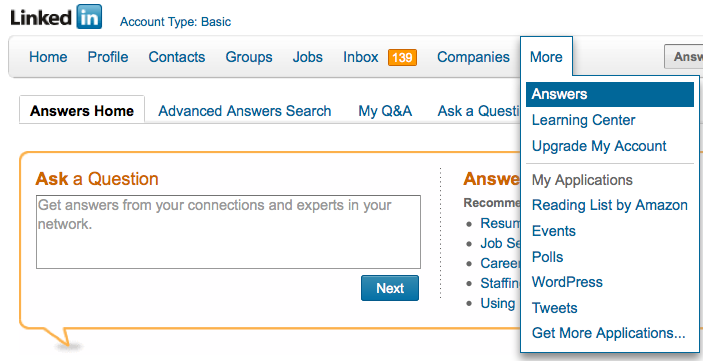
Read through the questions, choose the ones you are interested in answering and reply in the form provided. LinkedIn allows you to suggest other LinkedIn contacts to answer the question and offers the opportunity to share a link in reply to a question. If you have a blog, you may consider replying via your blog and sharing the link. Or, you may already have a post that provides a good answer; share that link.) You can even reply privately to the questioner if you do not want your answer to be public.

Answering questions and demonstrating your expertise will help alert others in your industry and those interested in your work (whether you are a job seeker or entrepreneur) that you are willing and able to serve as an expert. In fact, I connected with my very first online client after answering some career oriented questions and hired my first web developer after he answered my question

One way to keep track of questions you might want to answer is to subscribe to the RSS feed of a topic of interest. If you are not familiar, RSS stands for really simple syndication. It is a way to receive information either via a “reader” or in your email, so you don’t need to personally visit every website or blog you enjoy to see if there is new information (or a new question). Common Craft has a great video to describe RSS.

(If you don’t use a feed reader already, maybe it is time! I use iGoogle, which you can use by signing up via your Google account. The video points out how to get started.)

Here’s how to subscribe to LinkedIn’s Answers:

From LinkedIn’s top toolbar, select MORE, then select ANSWERS.

Scroll down…

On the right side of the screen, you will see a column called BROWSE.

Select any topic from the list. (For example, “LAW AND LEGAL”).

Once you selected it, scroll down again.

At the bottom of the column, it will now have a little orange RSS symbol (shown to the right) and it should say:

Subscribe to new question in:

Law and Legal

Click on it.

Select the feed reader you use, for example, I use GOOGLE.

Choose to add to your reader or your homepage.

You’re done!

Subscribe to as many as you’d like, or  just plan some time every week to review questions in LinkedIn.

Stay tuned for more ways to demonstrate your expertise and stand a head above the rest!

Filed Under: Career Advice, Networking, Social Networking Tagged With: how to find a job, how to market your expertise, how to subscribe to LinkedIn's answers section, job search, keppie careers, linkedin, LinkedIn for job search, Miriam Salpeter, Personal Branding, small business owners

Should you eliminate buzzwords from your resume and online profiles?

December 16, 2010 By Miriam Salpeter

Job seekers can find a lot of “do” and “don’t” posts about their job hunt. Some of it is good advice, and other, while well meaning, may actually lead job hunters down the wrong path. A good case in point, LinkedIn’s recent post advising job seekers to avoid including any of the top 10 “buzz words” words in their profiles.

These are the most popular “overused buzzwords” in LinkedIn profiles in the U.S.:

1. Extensive experience
2. Innovative
3. Motivated
4. Results-oriented
5. Dynamic
6. Proven track record
7. Team player
8. Fast-paced
9. Problem solver
10. Entrepreneurial

LinkedIn also notes that popular words vary by region. (Not surprisingly!):

While members from the USA, Canada and Australia tend to emphasize their “extensive experience,” Brazilians, Indians and Spaniards identify themselves as “dynamic” professionals. Members in the UK call themselves more “motivated” and the French, the Germans, the Italians and the Dutch see themselves as “innovative.”

On the Career Trend blog, Rob Poindexter wrote about cliches, reacting to a news program, where all of the responses were trite:

Commentator:  What are your thoughts about the war in Afghanistan?
Panelist # 1:  All’s well that ends well.
Panelist # 2:  It’s not over ’til it’s over.
Panelist # 3:  One foot on a banana peel, the other in the grave.
Panelist # 4:  He who laughs last, laughs best.

Rob reminds readers not to let their resumes be a “cliche.” Absolutely good advice; you don’t want a resume that is nothing but buzzwords and devoid of quality content (like the commentators’ responses). But, is it time to do a search and destroy mission to eliminate all buzzwords from your resume and online profiles, as LinkedIn suggests?

Let’s think about it — why are these terms so popular? Because many of them describe exactly the type of person many employers want! So, take a step back and think about this before your revise your profile.

MSNBC’s career expert, Eve Tahmincioglu responded to LinkedIn’s post with a measured, and I believe appropriate answer. She asks, Are buzzwords really a bad thing?:

Admit it, you probably have one or two of these on your resume or LinkedIn profile. But is that really a bad thing? Who cares if they’re buzz words if they convey what you want?

I couldn’t agree more. Of course, if you read your profile and you list every single “cliche” without providing information that supports your claims, it’s probably time for a makeover. You need to show, not tell — focus your efforts on telling a story that is both about you and targeted to your next employer.

It’s not a good idea to “outlaw” words on resumes, even if they may be a little overused. Do I write resumes full of cliches? No, but I do target my clients’ resumes to their desired employers!

The most important thing to keep in mind is that your materials need to be as much about your employer as they are about you. Focus on their needs and make a clear case for why you have the skills and experience to accomplish their goals – and to solve their problems. Might that mean including a few buzzwords? I think so — there is a reason that buzzwords are buzzing! But, be sure your materials don’t sound like the seemingly unthinking, cliche-spewing commentators Rob mentioned in his Career Trend post.

LinkedIn suggests making your profile “more actionable,” which is a great idea, but I don’t think that simply “losing” all the buzzwords is the answer. “All things in moderation!” (I had to get at least one cliche in — but isn’t it true?)

What do you think? Do you have buzzwords in your materials? Will you be doing a search and destroy mission?

photo by autan

Filed Under: Career Advice, Resume Advice Tagged With: buzzwords, career coach, cliches in resumes, Eve Tahmincioglu, how to write a resume, linkedin, Miriam Salpeter, resume, resume writer, Rob Poindexter

Important LinkedIn change impacts job seekers

December 10, 2010 By Miriam Salpeter

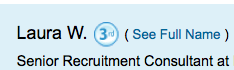
Watching changes in social networking platforms and keeping up-to-date on their ever-changing tools can be a full-time job. My colleague, Jason Alba, author of I’m On LinkedIn, Now What?, posted yesterday about a new development in LinkedIn search that is important for job seekers. He explains that when a non-paying LinkedIn user reviews a third-degree connection’s profile, LinkedIn does not share that person’s name in the headline. (It lists the first name and last initial — see photo below/right). 

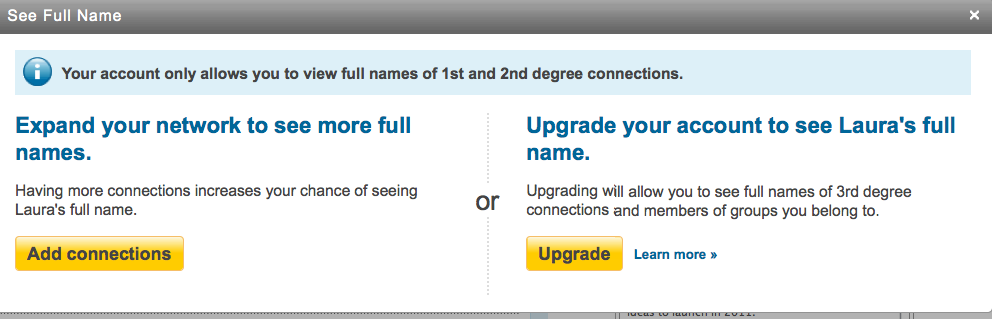
It then prompts the user with two choices:

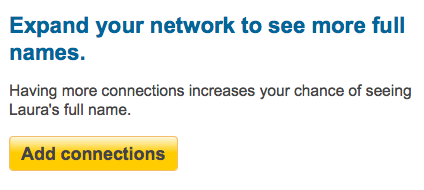
1. To expand your network to enhance your opportunity to connect with the user at a second-degree level. (This would be free, but takes effort.)

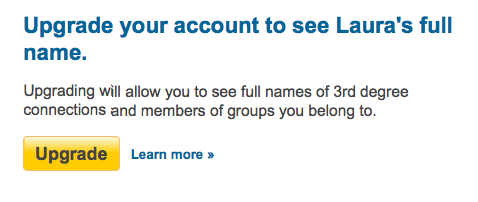
2. To upgrade to a paid account that will allow the person to easily find full names for third-degree contacts

This is an interesting development, and Jason notes that it probably is a precursor for other, similar moves by LinkedIn to withhold information and potentially encourage more people to become paid members.

However, at this point, LinkedIn really does not have the upper hand in preventing people from identifying full contact information or names of those whose last names it may withhold. I can (at this point) still see the entire actual profile of my third-degree connections (sans last name in the headline). Any information they share in their profiles (including listing an email address or full name in their profile or Summary section, their personal websites, Twitter accounts, Slideshares, etc.) is still readily available.

My advice to job seekers (and everyone who wants to make it easy — and free) for people to know who you are? Include your full name in your Summary section, link your other professional websites and social networks that have links to your work or work products and consider sharing an email in the context of your Summary.

While it is possible that LinkedIn will become draconian and try to prevent us from sharing this information, or that it will set things up so we cannot easily access other identifying information (such as Twitter account, websites, etc.), that is not the case right now.

Help someone find you by updating your profile. And, consider having your own social resume — a website that you control to share information you want people to know about you. Contact me if you’re interested in owning YourName.com, but could use some help creating a fully operational site that search engines will love and will showcase your best professional information!

Filed Under: social media, Social Networking Tagged With: how to find a job, how to write a LinkedIn profile, Jason Alba, job search, keppie careers, linkedin, Miriam Salpeter

Don’t make these online job hunting mistakes

July 21, 2010 By Miriam Salpeter

In an article for the Wall Street Journal, Elizabeth Garone shared five tips to help job seekers avoid typical social networking mistakes. While there are a lot of ways to use social media tools to help land an opportunity, it’s easy to make newbie mistakes when just getting started. I’m sure you’ve heard of or read about people who have been fired for what they posted on Facebook. Maybe you’ve seen the compilations of unwise posts from Twitter, such as ResumeBear’s 30 ways to lose a job on Twitter.

As a proponent of using social networking to enhance job seeking opportunities, I encourage people to jump in and take advantage of all the great tools, but it’s important to remember what NOT to do.

These are the mistakes Elizabeth highlights in her article. Be sure to READ THE FULL POST for specific advice and details.

1. Forgetting manners.

I was delighted to be quoted in this section! In short – “Assume your future boss is reading everything you share online.”

2. Overkill.

Signing up for too many networks and not making an effort to complete your profiles does not move your search forward.

3. Not getting the word out.

It’s important to let your networks know you are looking.

4. Quantity over quality.

Connect carefully and personalize your invitations.

5. Online exclusivity.

Don’t spend all of your time searching online; many jobs are not posted.

Don’t miss the expert advice from Sree Sreenivasan, dean of students at Columbia University Graduate School of Journalism, Krista Canfield, a LinkedIn spokesperson, author Emily Bennington and personal branding expert Dan Schawbel in the Wall Street Journal’s FULL POST.

Filed Under: Career Advice, Job Hunting Tools, Quoted in..., Social Networking Tagged With: Dan Schawbel, ELIZABETH GARONE, how to find a job, job search, Keppie Creers, Krista Canfield, linkedin, Miriam Salpeter, Resume Bear, social media, Sree Sreenivasan, wall street journal

Revisiting LinkedIn – new features for job seekers and networkers

July 12, 2010 By Miriam Salpeter

When is the last time you spent time in LinkedIn? I know, it’s not *fun* like Facebook, and it doesn’t provide the instantaneous thrill of Twitter — sending out a message and immediately receiving a reply. [Read more…] about Revisiting LinkedIn – new features for job seekers and networkers

Filed Under: Social Networking Tagged With: how to find a job, how to network, job hunt, job search, keppie careers, linkedin, looking for a job, Miriam Salpeter, network, what features on linkedin are good for job seekers

  • « Go to Previous Page
  • Page 1
  • Page 2
  • Page 3
  • Page 4
  • Page 5
  • Page 6
  • Page 7
  • Go to Next Page »

Follow Us!

  • Facebook
  • Instagram
  • LinkedIn
  • Pinterest
  • Twitter

Be an Insider: Sign Up to Receive Special Offers & Free Gift


About Keppie Careers

Are you a job seeker or business owner? You’ve come to the right place!
Click here to find out more.

Contact Us

Have a question or comment?
Click here to Contact Us.
© Copyright 2024 Keppie Careers